- 联系我们
- duidaima.com 版权声明
- 闽ICP备2020021581号
-
 闽公网安备 35020302035485号
闽公网安备 35020302035485号

import io.netty.channel.ChannelOption;
import io.netty.channel.ConnectTimeoutException;
import io.netty.handler.timeout.ReadTimeoutException;
import io.netty.handler.timeout.ReadTimeoutHandler;
import io.netty.handler.timeout.TimeoutException;
import jakarta.annotation.PostConstruct;
import java.time.Duration;
import org.slf4j.Logger;
import org.slf4j.LoggerFactory;
import org.springframework.beans.factory.annotation.Value;
import org.springframework.http.HttpMethod;
import org.springframework.http.MediaType;
import org.springframework.http.client.reactive.ReactorClientHttpConnector;
import org.springframework.stereotype.Service;
import org.springframework.web.reactive.function.client.WebClient;
import org.springframework.web.reactive.function.client.WebClientRequestException;
import org.springframework.web.reactive.function.client.WebClientResponseException;
import reactor.core.publisher.Mono;
import reactor.netty.http.client.HttpClient;
// 堆代码 duidaima.com
HttpClient httpClient =
        HttpClient.create()
            .option(ChannelOption.CONNECT_TIMEOUT_MILLIS, connectionTimeout)
            .responseTimeout(Duration.ofMillis(requestTimeout))
            .doOnConnected(conn -> conn.addHandlerLast(new ReadTimeoutHandler(readTimeout)));

   WebClient client =
        WebClient.builder().clientConnector(new ReactorClientHttpConnector(httpClient)).build();
(2) 同步发送请求(就像RestTemplate一样)public String postSynchronously(String url, String requestBody) {
LOG.info("Going to hit API - URL {} Body {}", url, requestBody);
String response = "";
try {
response =
client
.method(HttpMethod.POST)
.uri(url)
.accept(MediaType.ALL)
.contentType(MediaType.APPLICATION_JSON)
.bodyValue(requestBody)
.retrieve()
.bodyToMono(String.class)
.block();
} catch (Exception ex) {
LOG.error("Error while calling API ", ex);
throw new RunTimeException("XYZ service api error: " + ex.getMessage());
} finally {
LOG.info("API Response {}", response);
}
return response;
}
block()用于同步等待响应,这可能并不适合所有情况,你可能需要考虑subscribe()异步使用和处理响应。import org.springframework.http.MediaType;
import org.springframework.web.reactive.function.BodyInserters;
import org.springframework.web.reactive.function.client.WebClient;
import reactor.core.publisher.Mono;
public static Mono<String> makePostRequestAsync(String url, String postData) {
WebClient webClient = WebClient.builder().build();
return webClient.post()
.uri(url)
.contentType(MediaType.APPLICATION_FORM_URLENCODED)
.body(BodyInserters.fromFormData("data", postData))
.retrieve()
.bodyToMono(String.class);
}
要使用此函数,只需传入要向其发送 POST 请求的 URL 以及要在请求正文中以 URL 编码字符串形式发送的数据。关注工众号:码猿技术专栏,回复关键词:1111 获取阿里内部Java性能调优手册!该函数将返回来自服务器的响应,或者如果请求由于任何原因失败,则返回一条错误消息。makePostRequestAsync( "https://example.com/api" , "param1=value1¶m2=value2" )
.subscribe(response -> {
// 处理响应
System.out.println ( response );
}, error -> {
/ / 处理错误
System.err.println ( error .getMessage ());
}
);
subscribe()用于异步处理响应,你可以提供两个 lambda 表达式作为 subscribe() 的参数。如果请求成功并收到响应作为参数,则执行第一个 lambda 表达式;如果请求失败并收到错误作为参数,则执行第二个 lambda 表达式。
import org.springframework.http.HttpStatus;
import org.springframework.http.MediaType;
import org.springframework.web.reactive.function.BodyInserters;
import org.springframework.web.reactive.function.client.WebClient;
import reactor.core.publisher.Mono;

public static Mono<String> makePostRequestAsync(String url, String postData) {
    WebClient webClient = WebClient.builder()
            .baseUrl(url)
            .build();
    return webClient.post()
            .uri("/")
            .contentType(MediaType.APPLICATION_FORM_URLENCODED)
            .body(BodyInserters.fromFormData("data", postData))
            .retrieve()
            .onStatus(HttpStatus::is4xxClientError, clientResponse -> Mono.error(new RuntimeException("Client error")))
            .onStatus(HttpStatus::is5xxServerError, clientResponse -> Mono.error(new RuntimeException("Server error")))
            .bodyToMono(String.class);
}
在此示例中,该onStatus()方法被调用两次,一次针对 4xx 客户端错误,一次针对 5xx 服务器错误。onStatus() 每次调用都采用两个参数:
aPredicate确定错误状态代码是否与条件匹配makePostRequestAsync("https://example.com/api", "param1=value1¶m2=value2")
.subscribe(response -> {
// handle the response
System.out.println(response);
}, error -> {
// handle the error
System.err.println("An error occurred: " + error.getMessage());
if (error instanceof WebClientResponseException) {
WebClientResponseException webClientResponseException = (WebClientResponseException) error;
int statusCode = webClientResponseException.getStatusCode().value();
String statusText = webClientResponseException.getStatusText();
System.err.println("Error status code: " + statusCode);
System.err.println("Error status text: " + statusText);
}
});
subscribe方法中的第二个lambda表达式检查错误是否是WebClientResponseException的实例,这是WebClient在服务器有错误响应时抛出的特定类型的异常。如果它是WebClientResponseException的实例,则代码将从异常中提取状态代码和状态文本,并将它们记录到日志中。还可以根据发生的特定错误在此lambda表达式中添加其他错误处理逻辑。例如,你可以重试请求、回退到默认值或以特定方式记录错误。responseMono.subscribe(
response -> {
// handle the response
LOG.info("SUCCESS API Response {}", response);
},
error -> {
// handle the error
LOG.error("An error occurred: {}", error.getMessage());
LOG.error("error class: {}", error.getClass());
// Errors / Exceptions from Server
if (error instanceof WebClientResponseException) {
WebClientResponseException webClientResponseException =
(WebClientResponseException) error;
int statusCode = webClientResponseException.getStatusCode().value();
String statusText = webClientResponseException.getStatusText();
LOG.info("Error status code: {}", statusCode);
LOG.info("Error status text: {}", statusText);
if (statusCode >= 400 && statusCode < 500) {
LOG.info(
"Error Response body {}", webClientResponseException.getResponseBodyAsString());
}
Throwable cause = webClientResponseException.getCause();
LOG.error("webClientResponseException");
if (null != cause) {
LOG.info("Cause {}", cause.getClass());
if (cause instanceof ReadTimeoutException) {
LOG.error("ReadTimeout Exception");
}
if (cause instanceof TimeoutException) {
LOG.error("Timeout Exception");
}
}
}
// Client errors i.e. Timeouts etc -
if (error instanceof WebClientRequestException) {
LOG.error("webClientRequestException");
WebClientRequestException webClientRequestException =
(WebClientRequestException) error;
Throwable cause = webClientRequestException.getCause();
if (null != cause) {
LOG.info("Cause {}", cause.getClass());
if (cause instanceof ReadTimeoutException) {
LOG.error("ReadTimeout Exception");
}
if (cause instanceof ConnectTimeoutException) {
LOG.error("Connect Timeout Exception");
}
}
}
});
超时return webClient
.method(this.httpMethod)
.uri(this.uri)
.headers(httpHeaders -> httpHeaders.addAll(additionalHeaders))
.bodyValue(this.requestEntity)
.retrieve()
.bodyToMono(responseType)
.timeout(Duration.ofMillis(readTimeout)) // request timeout for this request
.block();
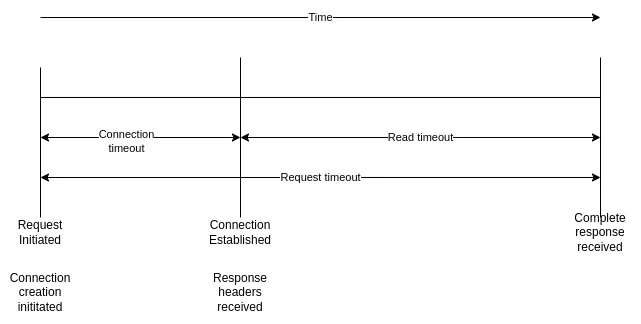
但是,我们无法在每个请求中设置连接超时,这是WebClient 的属性,只能设置一次。如果需要,我们始终可以使用新的连接超时值创建一个新的 Web 客户端实例。连接超时、读取超时和请求超时的区别如下: