
- 联系我们
- duidaima.com 版权声明
- 闽ICP备2020021581号
-
 闽公网安备 35020302035485号
闽公网安备 35020302035485号

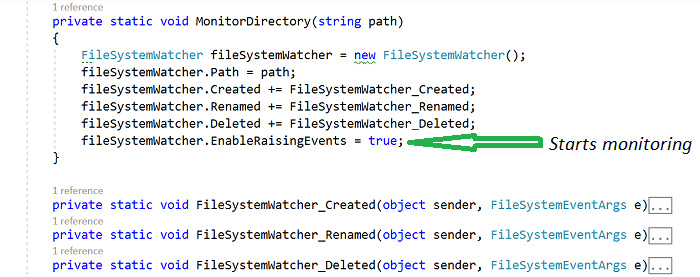
开局一张图,在 System.IO 下的 FileSystemWatcher 常用于监视文件系统的变更,当文件系统中的文件或者文件夹被修改会自动触发相应的回调事件。
为了能够了解 FileSystemWatcher 是怎么运作的,你可以指定一个被监视的文件夹,当被监视的文件夹修改后,大概会触发如下的一些事件。Renamed:当文件或者文件夹已经成功被重命名时触发此事件
        static void Main(string[] args)
        {
            string path = @"D:\IDG";

            MonitorDirectory(path);

            Console.ReadKey();
        }
        private static void MonitorDirectory(string path)
        {
            FileSystemWatcher fileSystemWatcher = new FileSystemWatcher();

            fileSystemWatcher.Path = path;

            fileSystemWatcher.Created += FileSystemWatcher_Created;
            fileSystemWatcher.Renamed += FileSystemWatcher_Renamed;

            fileSystemWatcher.Deleted += FileSystemWatcher_Deleted;

            fileSystemWatcher.EnableRaisingEvents = true;
        }
        private static void FileSystemWatcher_Created(object sender, FileSystemEventArgs e)
        {
            Console.WriteLine("File created: {0}", e.Name);
        }

        private static void FileSystemWatcher_Renamed(object sender, FileSystemEventArgs e)
        {
            Console.WriteLine("File renamed: {0}", e.Name);
        }

        private static void FileSystemWatcher_Deleted(object sender, FileSystemEventArgs e)
        {
            Console.WriteLine("File deleted: {0}", e.Name);
        }
using System;

using System.IO;

namespace IDGFileSystemWatcher
{
    class Program
    {
        static void Main(string[] args)
        {
            string path = @"D:\IDG";
            MonitorDirectory(path);
            Console.ReadKey();
        }
        private static void MonitorDirectory(string path)
        {
            FileSystemWatcher fileSystemWatcher = new FileSystemWatcher();
            fileSystemWatcher.Path = path;
            fileSystemWatcher.Created += FileSystemWatcher_Created;
            fileSystemWatcher.Renamed += FileSystemWatcher_Renamed;
            fileSystemWatcher.Deleted += FileSystemWatcher_Deleted;
            fileSystemWatcher.EnableRaisingEvents = true;
        }

        private static void FileSystemWatcher_Created(object sender, FileSystemEventArgs e)
        {
            Console.WriteLine("File created: {0}", e.Name);
        }

        private static void FileSystemWatcher_Renamed(object sender, FileSystemEventArgs e)
        {
            Console.WriteLine("File renamed: {0}", e.Name);
        }

        private static void FileSystemWatcher_Deleted(object sender, FileSystemEventArgs e)
        {
            Console.WriteLine("File deleted: {0}", e.Name);
        }
    }
}
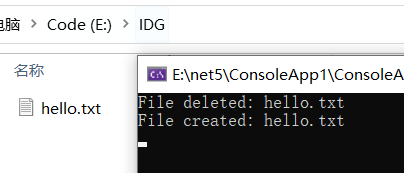
假设 IDG 文件夹是在 E 盘内,接下来把 Console 运行起来,然后在 IDG 文件夹内创建一个新文件,不出意外的话,你会观察到这个新建的文件名将会出现在 控制台 上,说明 FileSystemWatcher_Created 被成功触发,参考下图: