- 联系我们
- duidaima.com 版权声明
- 闽ICP备2020021581号
-
 闽公网安备 35020302035485号
闽公网安备 35020302035485号

AnimatedContainer({
    Key? key,
    this.alignment,
    this.padding,
    Color? color,
    Decoration? decoration,
    this.foregroundDecoration,
    double? width,
    double? height,
    BoxConstraints? constraints,
    this.margin,
    this.transform,
    this.transformAlignment,
    this.child,
    this.clipBehavior = Clip.none,
    Curve curve = Curves.linear,
    required Duration duration,
    VoidCallback? onEnd,
  });

Container({
    Key? key,
    this.alignment,
    this.padding,
    this.color,
    this.decoration,
    this.foregroundDecoration,
    double? width,
    double? height,
    BoxConstraints? constraints,
    this.margin,
    this.transform,
    this.transformAlignment,
    this.child,
    this.clipBehavior = Clip.none,
  });
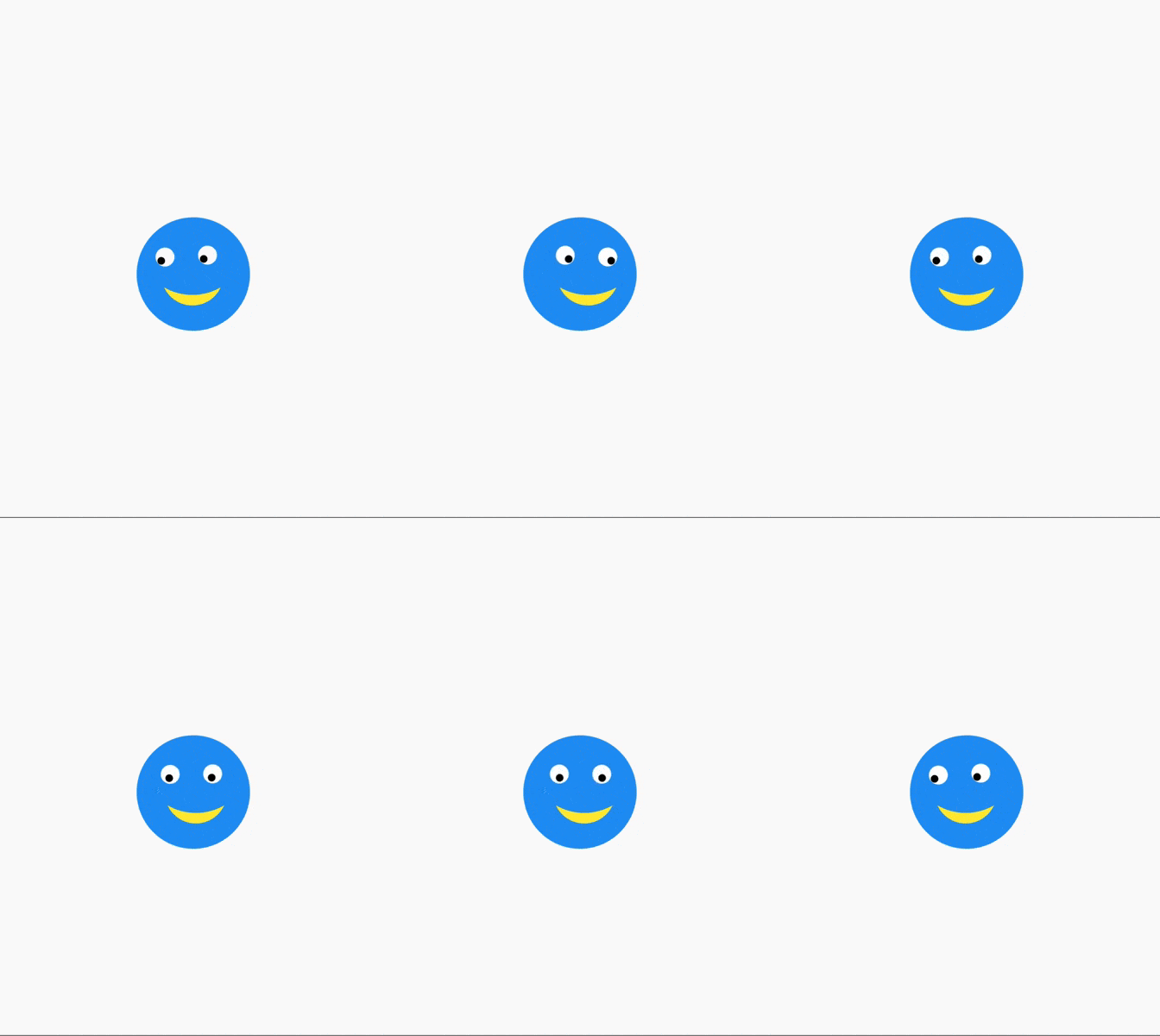
可以看到,实际上 AnimatedContainer 和 Container 只差了 3 个属性,而这三个属性就是控制动画的参数:AnimatedContainer的特性是所有涉及外观的属性都会生成一个过渡动效,当这些外观属性发生改变的时候就会使用生成的的动效来完成过渡,从而展现出动画效果。像我们要实现的笑嘻嘻的表情其实就是利用 AnimatedContainer 实现的。
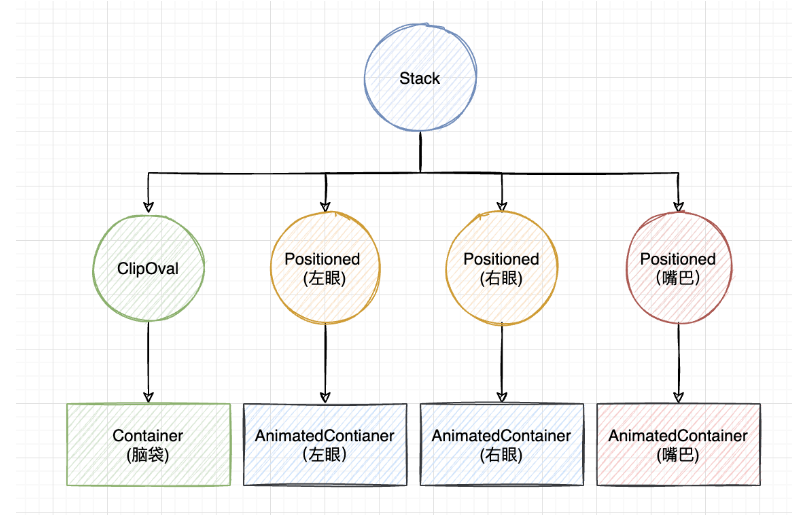
// 脑袋
ClipOval(
  child: Container(
    width: 120,
    height: 120,
    color: Colors.blue,
  ),
),
眼睛左眼和右眼有点不一样,眼球实际就是AnimatedContainer使用 borderRadius 裁剪为圆形,而眼珠是AnimatedContainer的子组件 —— 黑色的圆圈。具体实现向左或向右看使用一个变量 seeLeft 控制,而向左向右的转换过渡效果都由 AnimatedContainer 控制。// 堆代码 duidaima.com
// 左眼
Positioned(
top: marginTop,
left: marginLR,
child: AnimatedContainer(
alignment:
seeLeft ? Alignment.bottomLeft : Alignment.bottomRight,
padding: EdgeInsets.all(eyePadding),
transform: Matrix4.identity()
..translate(
seeLeft ? 0.0 : sideOffset, seeLeft ? eyeOffset : 0.0, 0),
duration: Duration(seconds: 1),
curve: Curves.fastOutSlowIn,
width: eyeSize,
height: eyeSize,
decoration: BoxDecoration(
color: Colors.white,
borderRadius: BorderRadius.circular(eyeSize / 2),
),
child: ClipOval(
child: Container(
color: Colors.black,
width: eyeBallSize,
height: eyeBallSize,
),
),
),
),
// 右眼
Positioned(
top: marginTop,
right: marginLR,
child: AnimatedContainer(
alignment:
seeLeft ? Alignment.bottomLeft : Alignment.bottomRight,
padding: EdgeInsets.all(eyePadding),
transform: Matrix4.identity()
..translate(seeLeft ? -sideOffset : 0.0,
seeLeft ? 0.0 : eyeOffset, 0),
duration: Duration(seconds: 1),
curve: Curves.fastOutSlowIn,
width: eyeSize,
height: eyeSize,
decoration: BoxDecoration(
color: Colors.white,
borderRadius: BorderRadius.circular(eyeSize / 2),
),
child: ClipOval(
child: Container(
color: Colors.black,
width: eyeBallSize,
height: eyeBallSize,
),
),
),
),
这里的眼珠对齐使用的就是AnimatedContainer 的 alignment参数控制,而眼球的位置使用 Matrix4 的平移实现:Matrix4.identity() ..translate(seeLeft ? -sideOffset : 0.0, seeLeft ? 0.0 : eyeOffset, 0),笑脸的实现使用ClipPath,绘制两条弧线就可以了,然后平移的幅度和眼珠保持一致,就可以感觉是转头的效果了,AnimatedContainer 部分的代码如下:
// 笑嘻嘻的嘴巴
Positioned(
  bottom: 10,
  height: 40,
  left: 0,
  child: AnimatedContainer(
    alignment:
        seeLeft ? Alignment.bottomLeft : Alignment.bottomRight,
    padding: EdgeInsets.all(4.0),
    transform: Matrix4.identity()
      ..translate(seeLeft ? 25.0 : 35.0, 0, 0),
    duration: Duration(seconds: 1),
    curve: Curves.fastOutSlowIn,
    child: ClipPath(
      clipper: SmileClipPath(),
      child: Container(
        width: 60,
        height: 40,
        color: Colors.yellow,
      ),
    ),
  ),
),
笑嘻嘻的嘴巴的裁剪类 SmileClipPath 代码如下:class SmileClipPath extends CustomClipper<Path> {
@override
Path getClip(Size size) {
return Path()
..moveTo(0, 0)
..arcToPoint(
Offset(size.width, 0),
radius: Radius.circular(size.width * 0.55),
clockwise: false,
)
..arcToPoint(
Offset(0, 0),
radius: Radius.circular(size.width),
clockwise: true,
);
}
@override
bool shouldReclip(covariant CustomClipper<Path> oldClipper) {
return false;
}
}
最后,控制状态变量 seeLeft 的变化通过一个按钮点击触发就好了。floatingActionButton: FloatingActionButton(
child: Icon(Icons.play_arrow, color: Colors.white),
onPressed: () {
setState(() {
seeLeft = !seeLeft;
});
},
),
最终运行效果如下