- 联系我们
- duidaima.com 版权声明
- 闽ICP备2020021581号
-
 闽公网安备 35020302035485号
闽公网安备 35020302035485号

<!-- 堆代码 duidaima.com -->
<!-- 基础框架组件 -->
<dependency>
    <groupId>org.springframework.boot</groupId>
    <artifactId>spring-boot-starter-web</artifactId>
    <version>${spring-boot.version}</version>
</dependency>

<!-- Excel组件 -->
<dependency>
    <groupId>com.alibaba</groupId>
    <artifactId>easyexcel</artifactId>
    <version>${easyexcel.version}</version>
    <exclusions>
        <exclusion>
            <groupId>org.slf4j</groupId>
            <artifactId>slf4j-api</artifactId>
        </exclusion>
    </exclusions>
</dependency>
三、上传下载spring:
# 文件配置
servlet:
multipart:
enabled: true
# 文件单个限制
max-file-size: 10MB
# 请求最大限制
max-request-size: 20MB
2、上传下载@RestController
public class FileWeb {
private static final Logger logger = LoggerFactory.getLogger(FileWeb.class);
@Resource
private FileService fileService ;
/**
* 堆代码 duidaima.com
* 文件上传
*/
@PostMapping("/file/upload")
public String upload (HttpServletRequest request,
@RequestParam("file") MultipartFile[] fileList) throws Exception {
String uploadUser = request.getParameter("uploadUser");
if (uploadUser.isEmpty()){
return "upload-user is empty";
}
logger.info("upload-user:{}",uploadUser);
for (MultipartFile multipartFile : fileList) {
// 解析文件信息和保存
fileService.dealFile(multipartFile);
}
return "success" ;
}
/**
* 文件下载
*/
@GetMapping("/file/download")
public void upload (@RequestParam("fileName") String fileName,
HttpServletResponse response) throws Exception {
if (!fileName.isBlank()){
String filePath = ResourceUtils.getURL("m1-04-boot-file/src/main/resources/file").getPath();
File file = new File(filePath,fileName) ;
response.setHeader("Content-Disposition",
"attachment;filename=" + URLEncoder.encode(fileName, StandardCharsets.UTF_8));
response.setContentType("application/octet-stream");
Files.copy(Paths.get(file.getPath()), response.getOutputStream());
}
}
}
/**
* 文件服务类
*/
@Service
public class FileService {
private static final Logger logger = LoggerFactory.getLogger(FileService.class);
public void dealFile (MultipartFile multipartFile) throws Exception {
logger.info("Name >> {}",multipartFile.getName());
logger.info("OriginalFilename >> {}",multipartFile.getOriginalFilename());
logger.info("ContentType >> {}",multipartFile.getContentType());
logger.info("Size >> {}",multipartFile.getSize());
// 文件输出地址
String filePath = ResourceUtils.getURL("m1-04-boot-file/src/main/resources/file").getPath();
File writeFile = new File(filePath, multipartFile.getOriginalFilename());
multipartFile.transferTo(writeFile);
}
}
使用Postman测试文件批量上传接口: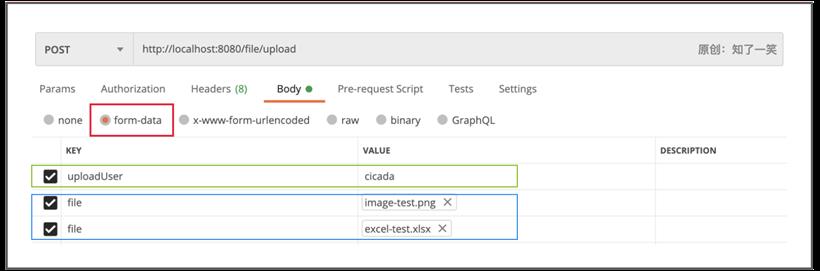
@Service
public class ExcelService {
    /**
     * Excel-写单个Sheet
     */
    public static void writeSheet () throws Exception {
        // 文件处理
        String basePath = getAbsolutePath();
        File file = new File(basePath+"/easy-excel-01.xlsx") ;
        checkOrCreateFile(file);
        // 执行写操作
        EasyExcel.write(file).head(DataVO.class)
                .sheet(0,"用户信息").doWrite(DataVO.getSheet1List());
    }
    /**
     * Excel-写多个Sheet
     */
    public static void writeSheets () throws Exception {
        // 文件处理
        String basePath = getAbsolutePath();
        File file = new File(basePath+"/easy-excel-02.xlsx") ;
        checkOrCreateFile(file);
        ExcelWriter excelWriter = null;
        try {
            excelWriter = EasyExcel.write(file).build();
            // Excel-Sheet1
            WriteSheet writeSheet1 = EasyExcel.writerSheet(0,"分页1").head(DataVO.class).build();
            // Excel-Sheet2
            WriteSheet writeSheet2 = EasyExcel.writerSheet(1,"分页2").head(DataVO.class).build();
            // Excel-Sheet3,写两个Table
            WriteSheet writeSheet3 = EasyExcel.writerSheet(2,"分页3").build();
            WriteTable dataTable = EasyExcel.writerTable(0).head(DataVO.class).build();
            WriteTable dataExtTable = EasyExcel.writerTable(1).head(DataExtVO.class).build();
            // 执行写操作
            excelWriter.write(DataVO.getSheet1List(), writeSheet1);
            excelWriter.write(DataVO.getSheet2List(), writeSheet2);
            excelWriter.write(DataVO.getSheet1List(),writeSheet3,dataTable) ;
            excelWriter.write(DataExtVO.getSheetList(),writeSheet3,dataExtTable) ;
        } catch (Exception e){
            e.printStackTrace();
        } finally {
            if (excelWriter != null){
                excelWriter.close();
            }
        }
    }
}

/**
 * 实体类,这里的注解会解析为Excel中的表头
 */
public class DataVO {
    @ExcelProperty("编号")
    private Integer id ;
    @ExcelProperty("名称")
    private String name ;
    @ExcelProperty("手机号")
    private String phone ;
    @ExcelProperty("城市")
    private String cityName ;
    @ExcelProperty("日期")
    private Date date ;
}
文件效果: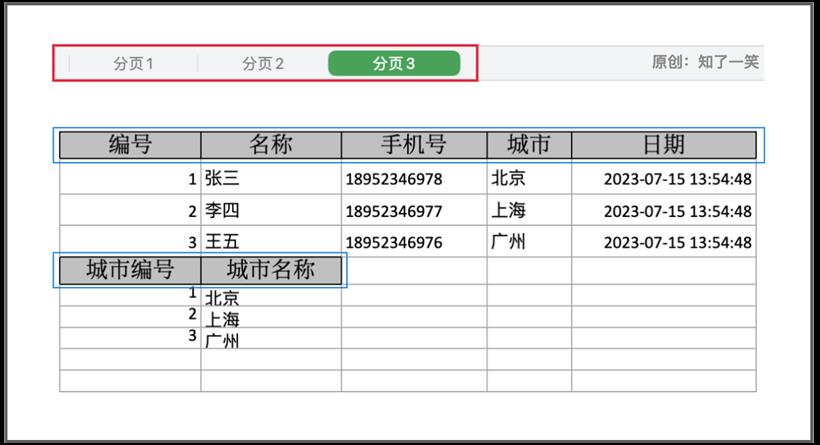
@Service
public class ExcelService {
    /**
     * Excel-读取数据
     */
    public static void readExcel () throws Exception {
        // 文件处理
        String basePath = getAbsolutePath();
        File file = new File(basePath+"/easy-excel-01.xlsx") ;
        if (!file.exists()){
            return ;
        }
        // 读取数据
        List<DataVO> dataList = EasyExcel.read(file).head(DataVO.class)
                .sheet(0).headRowNumber(1).doReadSync();
        dataList.forEach(System.out::println);
    }
    /**
     * Excel-读取数据使用解析监听器
     */
    public static void readExcelListener () throws Exception {
        // 文件处理
        String basePath = getAbsolutePath();
        File file = new File(basePath+"/easy-excel-01.xlsx") ;
        if (!file.exists()){
            return ;
        }
        // 读取数据,并且使用解析监听器
        DataListener dataListener = new DataListener() ;
        List<DataVO> dataSheetList = EasyExcel.read(file,dataListener).head(DataVO.class)
                .sheet(0).headRowNumber(1).doReadSync();
        dataSheetList.forEach(System.out::println);
    }
}
3、解析监听public class DataListener extends AnalysisEventListener<DataVO> {
/**
* 接收解析的数据块
*/
@Override
public void invoke(DataVO data, AnalysisContext context) {
System.out.println("DataListener:"+data);
}
/**
* 接收解析的表头
*/
@Override
public void invokeHeadMap(Map<Integer, String> headMap, AnalysisContext context) {
System.out.println("DataListener:"+headMap);
}
@Override
public void doAfterAllAnalysed(AnalysisContext context) {
System.out.println("DataListener:after...all...analysed");
}
}
4、导入导出@RestController
public class ExcelWeb {
@GetMapping("excel/download")
public void download(HttpServletResponse response) throws IOException {
response.setContentType("application/vnd.openxmlformats-officedocument.spreadsheetml.sheet");
response.setCharacterEncoding("utf-8");
String fileName = URLEncoder.encode("Excel数据", StandardCharsets.UTF_8).replaceAll("\\+", "%20");
response.setHeader("Content-disposition", "attachment;filename*=utf-8''" + fileName + ".xlsx");
EasyExcel.write(response.getOutputStream(), DataVO.class).sheet("用户").doWrite(DataVO.getSheet1List());
}
@ResponseBody
@PostMapping("excel/upload")
public String upload(@RequestParam("file") MultipartFile file) throws IOException {
List<DataVO> dataList = EasyExcel
.read(file.getInputStream(), DataVO.class, new DataListener()).sheet().doReadSync();
dataList.forEach(System.out::println);
return "success";
}
}
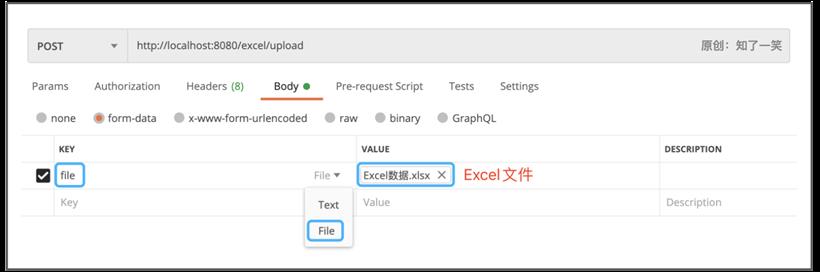
使用Postman测试单个Excel上传接口: