- 联系我们
- duidaima.com 版权声明
- 闽ICP备2020021581号
-
 闽公网安备 35020302035485号
闽公网安备 35020302035485号

import { fetch } from 'undici'
import FormData from 'form-data'
const body = new FormData()
body.append('file', new Blob(['hello world'], { type: 'text/plain' }), 'hello.txt')
await fetch('http://localhost:3000/upload', {
  method: 'POST',
  body
})
相反,请使用以下方法:import { fetch, FormData } from 'undici'
// 堆代码 duidaima.com
const body = new FormData()
body.append('file', new Blob(['hello world'], { type: 'text/plain' }), 'hello.txt')
await fetch('http://localhost:3000/upload', {
method: 'POST',
body
})
同样的逻辑适用于 Request、Response、Headers 等。这将在 Node.js v24 及更高版本中生效。import { WebSocketStream } from "undici";
const ws = new WebSocketStream('ws://localhost:3000/')
const { readable, writable } = await ws.opened
const writer = writable.getWriter();
writer.write('hello world')
for await (const value of readable) {
const parsed = new TextDecoder().decode(value)
console.log('received', parsed)
if (value === 'end') {
writer.close()
}
}
请注意,此实现是实验性的。import {
Agent,
interceptors,
setGlobalDispatcher,
getGlobalDispatcher
} from "undici";
setGlobalDispatcher(getGlobalDispatcher().compose(
interceptors.redirect({ maxRedirections: 3, throwOnMaxRedirects: true }),
interceptors.retry({
maxRetries: 3,
minTimeout: 1000,
maxTimeout: 10000,
timeoutFactor: 2,
retryAfter: true,
})
))
// 可以直接与原生 fetch 一起使用,无需修改。
await fetch(...)
以下是预构建的拦截器:import { Agent, setGlobalDispatchers, interceptors, request } from 'undici'
setGlobalDispatcher(getGlobalDispatcher().compose(
interceptors.cache(/* optional object for configuring */))
)
await request(‘http://localhost:3000’)
// Native fetch() support
await fetch(‘http://localhost:3000’)
我们还增加了一个 SQLite 缓存存储,如果 Node.js 的实验性 SQLite API 可用。它会将响应存储在 SQLite 数据库中,该数据库可以是内存型或基于文件的,这意味着它可以用于与其他 Node 进程共享缓存响应。import { request, setGlobalDispatcher, getGlobalDispatcher, interceptors, cacheStores } from 'undici'
// you will need to run this file with --experimental-sqlite setGlobalDispatcher(getGlobalDispatcher().compose(
interceptors.cache({
store: new cacheStores.SqliteCacheStore({
location: './cache.db'
})
})
))
const res = await request('http://localhost:3000/')
console.log(res.statusCode)
console.log(await res.body.text())
在组合时,请勿混用不同版本的 Undici'use strict'
// Do not initialize fetch() before requiring/importing undici
// Uncommenting the following line will break your code
// fetch('https://example.com').catch(console.error)
const undici = require('undici')
undici.setGlobalDispatcher(undici.getGlobalDispatcher().compose((dispatch) => {
return (opts, handler) => {
if (!handler.onRequestStart) {
throw new Error('Handler must implement onRequestStart')
}
return dispatch(opts, handler)
}
}))
undici.request('https://example.com').then((res) => {
console.log(res.statusCode)
return res.body.dump()
}).catch(console.error)
(示例使用 CommonJS,因为无法用 ESM 复制此功能。)Undici v7 暂无计划的支持期限。
其他相关更改
默认启用阻塞(除非为 HEAD 请求)
众所周知,Undici 支持 HTTP 管线化,允许在收到第一个请求的输出前发送多个请求。我们正在更改默认行为,默认启用阻塞选项:这样,Undici 会在接收到响应的头部后再发送下一个请求。
升级到 llhttp v9
新版本的 HTTP 解析器切换为始终严格的解析逻辑。如果您仅连接到符合 HTTP 规范的服务器,这一更改不会对您产生影响。如果这是一个重要问题,我们建议深入研究并参与贡献。
移除 throwOnError 选项
undici.request() 以前有一个 throwOnError 选项,用于对 4xx-5xx 范围内的状态码自动抛出异常。然而,这一功能现在由拦截器替代,因此不再需要这个选项。要实现相同的功能,现在可以使用拦截器:
import { createServer } from 'node:http'
import { once } from 'node:events'
import { interceptors, getGlobalDispatcher, request } from 'undici'

const server = createServer((req, res) => {
  console.log('request', req.url)
  res.statusCode = 404
  res.end('hello world')
})

server.listen(3000)
await once(server, 'listening')

const dispatcher = getGlobalDispatcher().compose(
  interceptors.responseError()
))
如果您尝试以下代码,将会触发异常:await request('http://localhost:3000/', { dispatcher }).
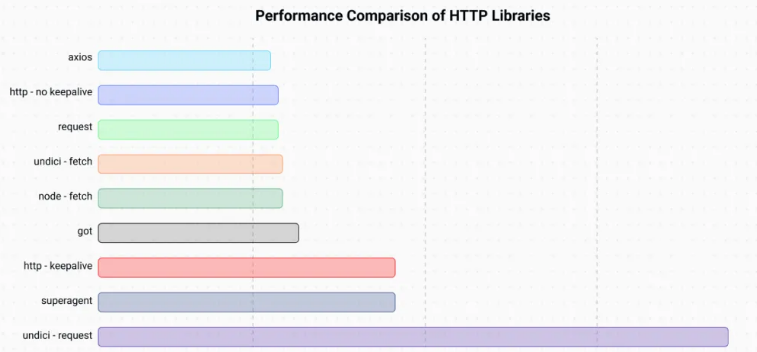
基准测试