- 联系我们
- duidaima.com 版权声明
- 闽ICP备2020021581号
-
 闽公网安备 35020302035485号
闽公网安备 35020302035485号

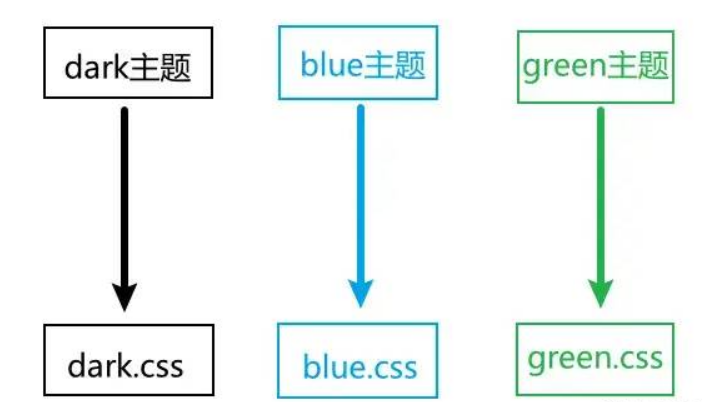
/* 堆代码 www.duidaima.com */
/* day样式主题 */
body.day .box {
  color: #f90;
  background: #fff;
}
/* dark样式主题 */
body.dark .box {
  color: #eee;
  background: #333;
}

.box {
  width: 100px;
  height: 100px;
  border: 1px solid #000;
}

<div class="box">
  <p>hello</p>
</div>
<p>
  选择样式:
  <button onclick="change('day')">day</button>
  <button onclick="change('dark')">dark</button>
</p>

function change(theme) {
  document.body.className = theme;
}
优点:html.dark {
color-scheme: dark;
}
实现方案如下:/* 定义根作用域下的变量 */
:root {
--theme-color: #333;
--theme-background: #eee;
}
/* 更改dark类名下变量的取值 */
.dark{
--theme-color: #eee;
--theme-background: #333;
}
/* 更改pink类名下变量的取值 */
.pink{
--theme-color: #fff;
--theme-background: pink;
}
.box {
transition: all .2s;
width: 100px;
height: 100px;
border: 1px solid #000;
/* 使用变量 */
color: var(--theme-color);
background: var(--theme-background);
}
优点:<script setup>
// 这里可以是原始对象值,也可以是ref()或reactive()包裹的值,根据具体需求而定
const theme = {
color: 'red'
}
</script>
<template>
<p>hello</p>
</template>
<style scoped>
p {
color: v-bind('theme.color');
}
</style>
Vue3中在style样式通过v-bind()绑定变量的原理其实就是给元素绑定CSS变量,在绑定的数据更新时调用CSSStyleDeclaration.setProperty更新CSS变量值。// 堆代码 www.duidaima.com
// 定义暗黑主题变量
export default {
fontSize: '16px',
fontColor: '#eee',
background: '#333',
};
// 定义白天主题变量
export default {
fontSize: '20px',
fontColor: '#f90',
background: '#eee',
};
import { shallowRef } from 'vue';
// 引入主题
import theme_day from './theme_day';
import theme_dark from './theme_dark';
// 定义在全局的样式变量
const theme = shallowRef({});
export function useTheme() {
// 尝试从本地读取
const localTheme = localStorage.getItem('theme');
theme.value = localTheme ? JSON.parse(localTheme) : theme_day;
const setDayTheme = () => {
theme.value = theme_day;
};
const setDarkTheme = () => {
theme.value = theme_dark;
};
return {
theme,
setDayTheme,
setDarkTheme,
};
}
使用自己封装的主题hook<script setup lang="ts">
import { useTheme } from './useTheme.ts';
import MyButton from './components/MyButton.vue';
const { theme } = useTheme();
</script>
<template>
<div class="box">
<span>Hello</span>
</div>
<my-button />
</template>
<style lang="scss">
.box {
width: 100px;
height: 100px;
background: v-bind('theme.background');
color: v-bind('theme.fontColor');
font-size: v-bind('theme.fontSize');
}
</style>
<script setup lang="ts">
import { useTheme } from '../useTheme.ts';
const { theme, setDarkTheme, setDayTheme } = useTheme();
const change1 = () => {
setDarkTheme();
};
const change2 = () => {
setDayTheme();
};
</script>
<template>
<button class="my-btn" @click="change1">dark</button>
<button class="my-btn" @click="change2">day</button>
</template>
<style scoped lang="scss">
.my-btn {
color: v-bind('theme.fontColor');
background: v-bind('theme.background');
}
</style>
其实从这里可以看到,跟Vue的响应式原理一样,只要数据发生改变,Vue就会把绑定了变量的地方通通更新。/* 字体定义规范 堆代码 www.duidaima.com */ $font_samll:12Px; $font_medium_s:14Px; $font_medium:16Px; $font_large:18Px; /* 背景颜色规范(主要) */ $background-color-theme: #d43c33;//背景主题颜色默认(网易红) $background-color-theme1: #42b983;//背景主题颜色1(QQ绿) $background-color-theme2: #333;//背景主题颜色2(夜间模式) /* 背景颜色规范(次要) */ $background-color-sub-theme: #f5f5f5;//背景主题颜色默认(网易红) $background-color-sub-theme1: #f5f5f5;//背景主题颜色1(QQ绿) $background-color-sub-theme2: #444;//背景主题颜色2(夜间模式) /* 字体颜色规范(默认) */ $font-color-theme : #666;//字体主题颜色默认(网易) $font-color-theme1 : #666;//字体主题颜色1(QQ) $font-color-theme2 : #ddd;//字体主题颜色2(夜间模式) /* 字体颜色规范(激活) */ $font-active-color-theme : #d43c33;//字体主题颜色默认(网易红) $font-active-color-theme1 : #42b983;//字体主题颜色1(QQ绿) $font-active-color-theme2 : #ffcc33;//字体主题颜色2(夜间模式) /* 边框颜色 */ $border-color-theme : #d43c33;//边框主题颜色默认(网易) $border-color-theme1 : #42b983;//边框主题颜色1(QQ) $border-color-theme2 : #ffcc33;//边框主题颜色2(夜间模式) /* 字体图标颜色 */ $icon-color-theme : #ffffff;//边框主题颜色默认(网易) $icon-color-theme1 : #ffffff;//边框主题颜色1(QQ) $icon-color-theme2 : #ffcc2f;//边框主题颜色2(夜间模式) $icon-theme : #d43c33;//边框主题颜色默认(网易) $icon-theme1 : #42b983;//边框主题颜色1(QQ) $icon-theme2 : #ffcc2f;//边框主题颜色2(夜间模式)定义混合mixin:
@import "./variable.scss";

@mixin bg_color(){
  background: $background-color-theme;
  [data-theme=theme1] & {
    background: $background-color-theme1;
  }
  [data-theme=theme2] & {
    background: $background-color-theme2;
  }
}
@mixin bg_sub_color(){
  background: $background-color-sub-theme;
  [data-theme=theme1] & {
    background: $background-color-sub-theme1;
  }
  [data-theme=theme2] & {
    background: $background-color-sub-theme2;
  }
}

@mixin font_color(){
  color: $font-color-theme;
  [data-theme=theme1] & {
    color: $font-color-theme1;
  }
  [data-theme=theme2] & {
    color: $font-color-theme2;
  }
}
@mixin font_active_color(){
  color: $font-active-color-theme;
  [data-theme=theme1] & {
    color: $font-active-color-theme1;
  }
  [data-theme=theme2] & {
    color: $font-active-color-theme2;
  }
}

@mixin icon_color(){
    color: $icon-color-theme;
    [data-theme=theme1] & {
        color: $icon-color-theme1;
    }
    [data-theme=theme2] & {
        color: $icon-color-theme2;
    }
}

@mixin border_color(){
  border-color: $border-color-theme;
  [data-theme=theme1] & {
    border-color: $border-color-theme1;
  }
  [data-theme=theme2] & {
    border-color: $border-color-theme2;
  }
}

<template>
  <div class="header" @click="changeTheme">
    <div class="header-left">
      <slot name="left">左边</slot>
    </div>
    <slot name="center" class="">中间</slot>
    <div class="header-right">
      <slot name="right">右边</slot>
    </div>
  </div>
</template>

<script>
  export default {
    name: 'Header',
    methods: {
      changeTheme () {
        document.documentElement.setAttribute('data-theme', 'theme1')
      }
    }
  }
</script>

<style scoped lang="scss">
@import "../assets/css/variable";
@import "../assets/css/mixin";
.header{
  width: 100%;
  height: 100px;
  font-size: $font_medium;
  @include bg_color();
}
</style>
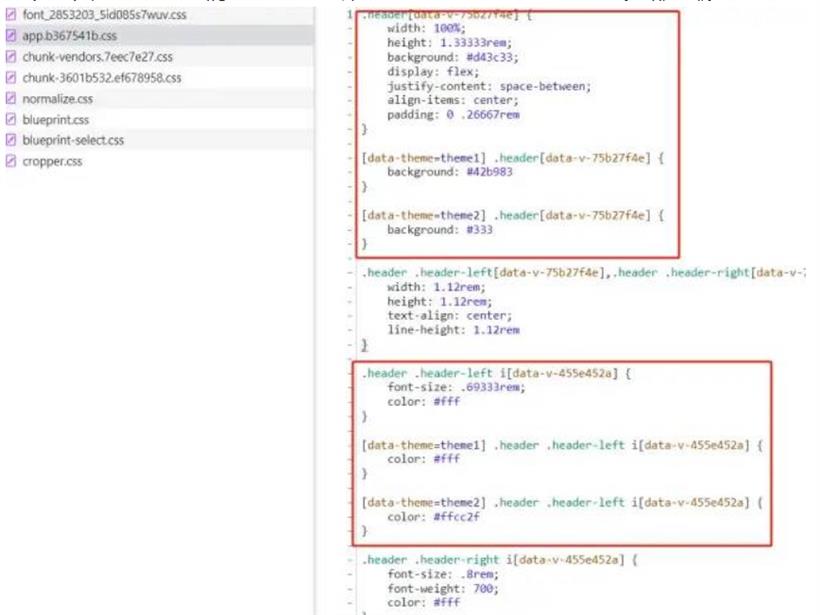
表现效果如下: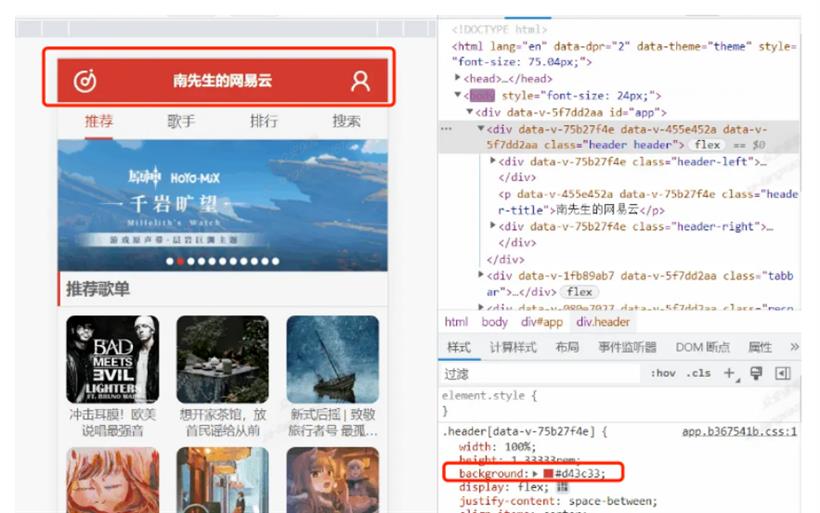
:root {
  --theme-color: #333;
  --theme-background: #eee;
}
定义一个工具类方法,用于修改指定的CSS变量值,调用的是CSSStyleDeclaration.setPropertyexport const setCssVar = (prop: string, val: any, dom = document.documentElement) => {
dom.style.setProperty(prop, val)
}
在样式发生改变时调用此方法即可setCssVar('--theme-color', color)
这里还用了vueuse的useCssVar不过效果和Vue3中使用v-bind绑定动态样式是差不多的,底层都是调用的CSSStyleDeclaration.setProperty这个api,这里就不多赘述vueuse中的用法。方案总结