- 联系我们
- duidaima.com 版权声明
- 闽ICP备2020021581号
-
 闽公网安备 35020302035485号
闽公网安备 35020302035485号

npx create-next-app@latest --js ui一路选NO,然后进入UI目录,在项目中添加Tailwind CSS:
npm install -D tailwindcss postcss autoprefixer
npx tailwindcss init -p
现在,修改Tailwind配置文件:ui/tailwind.config.js
module.exports = {
    content: [
        "./pages/**/*.{js,ts,jsx,tsx}",
        "./components/**/*.{js,ts,jsx,tsx}",
    ],
    theme: {
        extend: {},
    },
    plugins: [],
}
我们会修改ui/package.json配置文件,将Node.js应用程序导出为静态HTML页面,以便我们可以使用Actix Web通过文件服务器访问它们:{
"name": "ui",
"version": "0.1.0",
"private": true,
"scripts": {
"dev": "next dev",
"build": "next build && next export -o ../static",
"start": "next start",
"lint": "next lint"
},
"dependencies": {
"@headlessui/react": "^1.7.4",
"next": "13.0.4",
"react": "18.2.0",
"react-dom": "18.2.0"
},
"devDependencies": {
"autoprefixer": "^10.4.13",
"postcss": "^8.4.19",
"tailwindcss": "^3.2.4"
}
}
接下来,将Tailwind CSS工具导入到ui/styles/global.css文件中:@tailwind base; @tailwind components; @tailwind utilities;现在,让我们为客户端应用程序创建一些组件。
function getShortName(full_name = '') {
    if (full_name.includes(" ")) {
        const names = full_name.split(" ");
        return `${names[0].charAt(0)}${names[1].charAt(0)}`.toUpperCase()
    }
    return `${full_name.slice(0,2)}`.toUpperCase()
}

export default function Avatar({ children, color = '' }) {
  return (
    <div className='bg-blue-500 w-[45px] h-[45px] flex items-center justify-center rounded-full' style={{backgroundColor: color}}>
      <span className='font-bold text-sm text-white'>{getShortName(children)}</span>
    </div>
  )
}
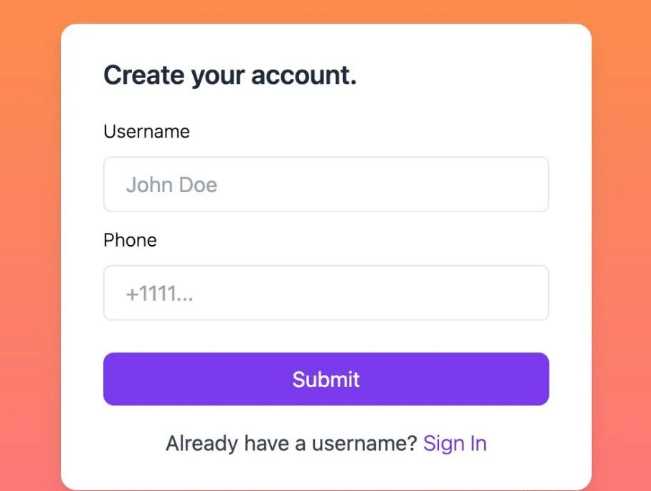
登录组件import { useState } from "react";
async function createAccount({ username, phone }) {
try {
// 堆代码 duidaima.com
const url = "http://localhost:8080/users/create";
let result = await fetch(url, {
method: "POST",
headers: {
"Content-Type": "application/json"
},
body: JSON.stringify({ username, phone })
});
return result.json();
} catch (e) {
return Promise.reject(e);
}
}
async function signIn({ phone }) {
try {
const url = "http://localhost:8080/users/phone/" + phone;
let result = await fetch(url);
return result.json();
} catch (e) {
return Promise.reject(e);
}
}
export default function Login({ show, setAuth }) {
const [isShowSigIn, setShowSignIn] = useState(false);
const showSignIn = () => {
setShowSignIn(prev => !prev)
}
const FormCreateUsername = ({ setAuth }) => {
const onCreateUsername = async (e) => {
e.preventDefault();
let username = e.target.username.value;
let phone = e.target.phone.value;
if (username === "" || phone === "") {
return;
}
let res = await createAccount({ username, phone });
if (res === null) {
alert("Failed to create account");
return;
}
setAuth(res)
}
return (
<form action="" className="mt-4 space-y-2" onSubmit={onCreateUsername}>
<div>
<label className="text-sm font-light">Username</label>
<input required type="text" name="username" placeholder="John Doe"
className="w-full px-4 py-2 mt-2 border rounded-md focus:outline-none focus:ring-1 focus:ring-blue-600" />
</div>
<div>
<label className="text-sm font-light">Phone</label>
<input required type="text" name="phone" placeholder="+1111..."
className="w-full px-4 py-2 mt-2 border rounded-md focus:outline-none focus:ring-1 focus:ring-blue-600" />
</div>
<div className="flex items-baseline justify-between">
<button type="submit"
className="px-6 py-2 mt-4 text-white bg-violet-600 rounded-lg hover:bg-violet-700 w-full">Submit</button>
</div>
<div className="pt-2 space-y-2 text-center">
<p className="text-base text-gray-700">Already have a username? <button onClick={showSignIn} className="text-violet-700 font-light">Sign In</button></p>
</div>
</form>
)
}
const FormSignIn = ({ setAuth }) => {
const onSignIn = async (e) => {
e.preventDefault();
let phone = e.target.phone.value;
if (phone === "") {
return;
}
let res = await signIn({ phone });
if (res === null) {
alert("Failed to create account");
return;
}
if (!res.id) {
alert(`Phone number not found ${phone}`);
return;
}
setAuth(res)
}
return (
<form action="" className="mt-4 space-y-2" onSubmit={onSignIn}>
<div>
<label className="text-sm font-light">Phone</label>
<input required type="text" name="phone" placeholder="+1111..."
className="w-full px-4 py-2 mt-2 border rounded-md focus:outline-none focus:ring-1 focus:ring-blue-600" />
</div>
<div className="flex items-baseline justify-between">
<button type="submit"
className="px-6 py-2 mt-4 text-white bg-violet-600 rounded-lg hover:bg-violet-700 w-full">Submit</button>
</div>
<div className="pt-2 space-y-2 text-center">
<p className="text-base text-gray-700">Don't have username? <button onClick={showSignIn} className="text-violet-700 font-light">Create</button></p>
</div>
</form>
)
}
return (
<div className={`${show ? '' : 'hidden'} bg-gradient-to-b from-orange-400 to-rose-400`}>
<div className="flex items-center justify-center min-h-screen">
<div className="px-8 py-6 mt-4 text-left bg-white max-w-[400px] w-full rounded-xl shadow-lg">
<h3 className="text-xl text-slate-800 font-semibold">{isShowSigIn ? 'Log in with your phone.' : 'Create your account.'}</h3>
{isShowSigIn ? <FormSignIn setAuth={setAuth} /> : <FormCreateUsername setAuth={setAuth} />}
</div>
</div>
</div>
)
}
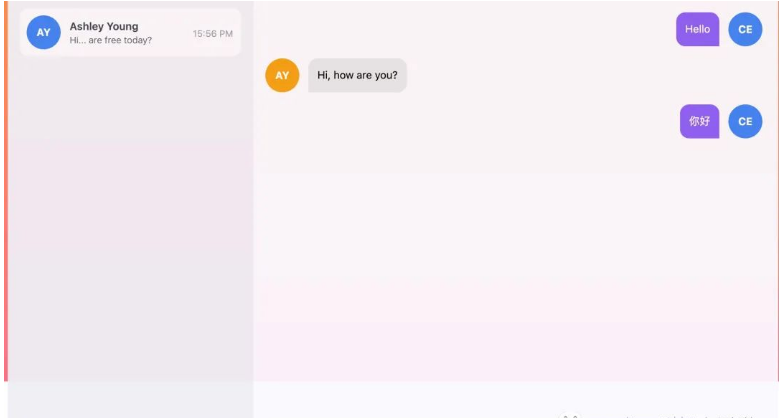
聊天室组件import React, { useState, useEffect } from "react";
import Avatar from "./avatar";
// 堆代码 duidaima.com
async function getRooms() {
try {
const url = "http://localhost:8080/rooms";
let result = await fetch(url);
return result.json();
} catch (e) {
console.log(e);
return Promise.resolve(null);
}
}
function ChatListItem({ onSelect, room, userId, index, selectedItem }) {
const { users, created_at, last_message } = room;
const active = index == selectedItem;
const date = new Date(created_at);
const ampm = date.getHours() >= 12 ? 'PM' : 'AM';
const time = `${date.getHours()}:${date.getMinutes()} ${ampm}`
const name = users?.filter(user => user.id != userId).map(user => user.username)[0];
return (
<div
onClick={() => onSelect(index, {})}
className={`${active ? 'bg-[#FDF9F0] border border-[#DEAB6C]' : 'bg-[#FAF9FE] border border-[#FAF9FE]'} p-2 rounded-[10px] shadow-sm cursor-pointer`} >
<div className='flex justify-between items-center gap-3'>
<div className='flex gap-3 items-center w-full'>
<Avatar>{name}</Avatar>
<div className="w-full max-w-[150px]">
<h3 className='font-semibold text-sm text-gray-700'>{name}</h3>
<p className='font-light text-xs text-gray-600 truncate'>{last_message}</p>
</div>
</div>
<div className='text-gray-400 min-w-[55px]'>
<span className='text-xs'>{time}</span>
</div>
</div>
</div>
)
}
export default function ChatList({ onChatChange, userId }) {
const [data, setData] = useState([])
const [isLoading, setLoading] = useState(false)
const [selectedItem, setSelectedItem] = useState(-1);
useEffect(() => {
setLoading(true)
getRooms()
.then((data) => {
setData(data)
setLoading(false)
})
}, [])
const onSelectedChat = (idx, item) => {
setSelectedItem(idx)
let mapUsers = new Map();
item.users.forEach(el => {
mapUsers.set(el.id, el);
});
const users = {
get: (id) => {
return mapUsers.get(id).username;
},
get_target_user: (id) => {
return item.users.filter(el => el.id != id).map(el => el.username).join("")
}
}
onChatChange({ ...item.room, users })
}
return (
<div className="overflow-hidden space-y-3">
{isLoading && <p>Loading chat lists.</p>}
{
data.map((item, index) => {
return <ChatListItem
onSelect={(idx) => onSelectedChat(idx, item)}
room={{ ...item.room, users: item.users }}
index={index}
key={item.room.id}
userId={userId}
selectedItem={selectedItem} />
})
}
</div>
)
}
对话组件import React, { useEffect, useRef } from "react";
import Avatar from "./avatar"
function ConversationItem({ right, content, username }) {
if (right) {
return (
<div className='w-full flex justify-end'>
<div className='flex gap-3 justify-end'>
<div className='max-w-[65%] bg-violet-500 p-3 text-sm rounded-xl rounded-br-none'>
<p className='text-white'>{content}</p>
</div>
<div className='mt-auto'>
<Avatar>{username}</Avatar>
</div>
</div>
</div>
)
}
return (
<div className='flex gap-3 w-full'>
<div className='mt-auto'>
<Avatar color='rgb(245 158 11)'>{username}</Avatar>
</div>
<div className='max-w-[65%] bg-gray-200 p-3 text-sm rounded-xl rounded-bl-none'>
<p>{content}</p>
</div>
</div>
)
}
export default function Conversation({ data, auth, users }) {
const ref = useRef(null);
useEffect(() => {
ref.current?.scrollTo(0, ref.current.scrollHeight)
}, [data]);
return (
<div className='p-4 space-y-4 overflow-auto' ref={ref}>
{
data.map(item => {
return <ConversationItem
right={item.user_id === auth.id}
content={item.content}
username={users.get(item.user_id)}
key={item.id} />
})
}
</div>
)
}
现在让我们编写与WebSocket服务器和REST API服务器交互所需的hook。import { useEffect, useRef } from "react";
export default function useWebsocket(onMessage) {
const ws = useRef(null);
useEffect(() => {
if (ws.current !== null) return;
const wsUri = 'ws://localhost:8080/ws';
ws.current = new WebSocket(wsUri);
ws.current.onopen = () => console.log("ws opened");
ws.current.onclose = () => console.log("ws closed");
const wsCurrent = ws.current;
return () => {
wsCurrent.close();
};
}, []);
useEffect(() => {
if (!ws.current) return;
ws.current.onmessage = e => {
onMessage(e.data)
};
}, []);
const sendMessage = (msg) => {
if (!ws.current) return;
ws.current.send(msg);
}
return sendMessage;
}
useLocalStorage Hookimport { useEffect, useState } from "react";
export default function useLocalStorage(key, defaultValue) {
const [storedValue, setStoredValue] = useState(defaultValue);
const setValue = (value) => {
try {
const valueToStore = value instanceof Function ? value(storedValue) : value;
setStoredValue(valueToStore);
if (typeof window !== "undefined") {
window.localStorage.setItem(key, JSON.stringify(valueToStore));
}
} catch (error) {
}
};
useEffect(() => {
try {
const item = window.localStorage.getItem(key);
let data = item ? JSON.parse(item) : defaultValue;
setStoredValue(data)
} catch (error) {}
}, [])
return [storedValue, setValue];
}
useConversation Hookimport { useEffect, useState } from "react";
const fetchRoomData = async (room_id) => {
if (!room_id) return;
const url = `http://localhost:8080/conversations/${room_id}`;
try {
let resp = await fetch(url).then(res => res.json());
return resp;
} catch (e) {
console.log(e);
}
}
export default function useConversations(room_id) {
const [isLoading, setIsLoading] = useState(true);
const [messages, setMessages] = useState([]);
const updateMessages = (resp = []) => {
setIsLoading(false);
setMessages(resp)
}
const fetchConversations = (id) => {
setIsLoading(true)
fetchRoomData(id).then(updateMessages)
}
useEffect(() => fetchConversations(room_id), []);
return [isLoading, messages, setMessages, fetchConversations];
}
import Head from 'next/head'
import React, { useEffect, useState } from 'react'
import Avatar from '../components/avatar'
import ChatList from '../components/room'
import Conversation from '../components/conversation'
import Login from '../components/login'
import useConversations from '../libs/useConversation'
import useLocalStorage from '../libs/useLocalStorage'
import useWebsocket from '../libs/useWebsocket'
现在,让我们为聊天页面设置状态:export default function Home() {
const [room, setSelectedRoom] = useState(null);
const [isTyping, setIsTyping] = useState(false);
const [showLogIn, setShowLogIn] = useState(false);
const [auth, setAuthUser] = useLocalStorage("user", false);
const [isLoading, messages, setMessages, fetchConversations] = useConversations("");
...
}
下面的函数将处理所有进出WebSocket服务器的消息:export default function Home() {
...
const handleTyping = (mode) => {
if (mode === "IN") {
setIsTyping(true)
} else {
setIsTyping(false)
}
}
const handleMessage = (msg, userId) => {
setMessages(prev => {
const item = { content: msg, user_id: userId };
return [...prev, item];
})
}
const onMessage = (data) => {
try {
let messageData = JSON.parse(data);
switch (messageData.chat_type) {
case "TYPING": {
handleTyping(messageData.value[0]);
return;
}
case "TEXT": {
handleMessage(messageData.value[0], messageData.user_id);
return;
}
}
} catch (e) {
console.log(e);
}
}
const sendMessage = useWebsocket(onMessage)
const updateFocus = () => {
const data = {
id: 0,
chat_type: "TYPING",
value: ["IN"],
room_id: room.id,
user_id: auth.id
}
sendMessage(JSON.stringify(data))
}
const onFocusChange = () => {
const data = {
id: 0,
chat_type: "TYPING",
value: ["OUT"],
room_id: room.id,
user_id: auth.id
}
sendMessage(JSON.stringify(data))
}
const submitMessage = (e) => {
e.preventDefault();
let message = e.target.message.value;
if (message === "") {
return;
}
if (!room.id) {
alert("Please select chat room!")
return
}
const data = {
id: 0,
chat_type: "TEXT",
value: [message],
room_id: room.id,
user_id: auth.id
}
sendMessage(JSON.stringify(data))
e.target.message.value = "";
handleMessage(message, auth.id);
onFocusChange();
}
......
}
handleTyping:更新状态以显示键入指示器export default function Home() {
......
const updateMessages = (data) => {
if (!data.id) return;
fetchConversations(data.id)
setSelectedRoom(data)
}
const signOut = () => {
window.localStorage.removeItem("user");
setAuthUser(false);
}
useEffect(() => setShowLogIn(!auth), [auth])
......
}
现在,让我们将所有数据显示给客户端:export default function Home() {
......
return (
<div>
<Head>
<title>Rust with react chat app</title>
<meta name="description" content="Rust with react chat app" />
<link rel="icon" href="/favicon.ico" />
</Head>
<Login show={showLogIn} setAuth={setAuthUser} />
<div className={`${!auth && 'hidden'} bg-gradient-to-b from-orange-400 to-rose-400 h-screen p-12`}>
<main className='flex w-full max-w-[1020px] h-[700px] mx-auto bg-[#FAF9FE] rounded-[25px] backdrop-opacity-30 opacity-95'>
<aside className='bg-[#F0EEF5] w-[325px] h-[700px] rounded-l-[25px] p-4 overflow-auto relative'>
<ChatList onChatChange={updateMessages} userId={auth.id} />
<button onClick={signOut} className='text-xs w-full max-w-[295px] p-3 rounded-[10px] bg-violet-200 font-semibold text-violet-600 text-center absolute bottom-4'>LOG OUT</button>
</aside>
{room?.id && (<section className='rounded-r-[25px] w-full max-w-[690px] grid grid-rows-[80px_minmax(450px,_1fr)_65px]'>
<div className='rounded-tr-[25px] w-ful'>
<div className='flex gap-3 p-3 items-center'>
<Avatar color='rgb(245 158 11)'>{room.users.get_target_user(auth.id)}</Avatar>
<div>
<p className='font-semibold text-gray-600 text-base'>{room.users.get_target_user(auth.id)}</p>
<div className='text-xs text-gray-400'>{isTyping ? "Typing..." : "10:15 AM"}</div>
</div>
</div>
<hr className='bg-[#F0EEF5]' />
</div>
{(isLoading && room.id) && <p className="px-4 text-slate-500">Loading conversation...</p>}
<Conversation data={messages} auth={auth} users={room.users} />
<div className='w-full'>
<form onSubmit={submitMessage} className='flex gap-2 items-center rounded-full border border-violet-500 bg-violet-200 p-1 m-2'>
<input
onBlur={onFocusChange}
onFocus={updateFocus}
name="message"
className='p-2 placeholder-gray-600 text-sm w-full rounded-full bg-violet-200 focus:outline-none'
placeholder='Type your message here...' />
<button type='submit' className='bg-violet-500 rounded-full py-2 px-6 font-semibold text-white text-sm'>Sent</button>
</form>
</div>
</section>)}
</main>
</div>
</div>
)
......
}
运行聊天应用cargo run
Finished dev [unoptimized + debuginfo] target(s) in 1.16s
Running `target/debug/rust-react-chat`
Server running at http://127.0.0.1:8080/
启动Web端 npm run dev - ready started server on 0.0.0.0:3000, url: http://localhost:3000在浏览器中输入:http://localhost:3000