- 联系我们
- duidaima.com 版权声明
- 闽ICP备2020021581号
-
 闽公网安备 35020302035485号
闽公网安备 35020302035485号

先看效果图:
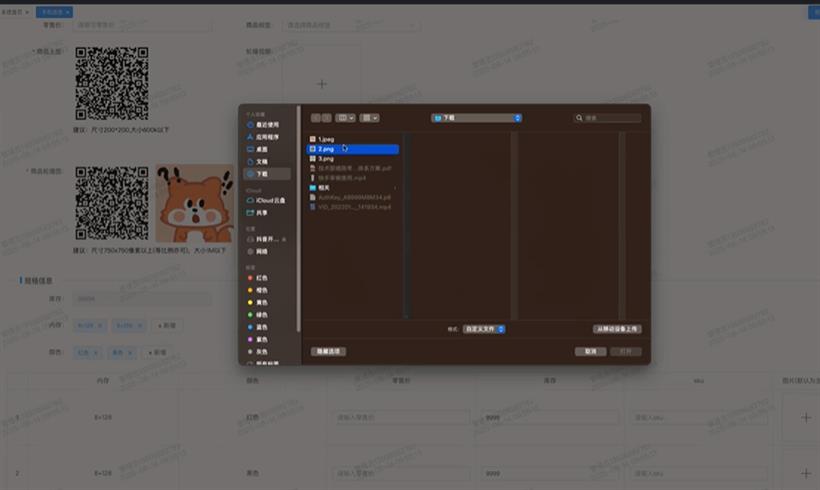
单张图片上传
下面是单张图片的上传方法。调用的时候很方便,一共就1行代码。只需要关注显示图片的大小,图片字段key,以及是哪个form中的数据,还能限制图片大小的等等,有需要可以自行扩展。<el-form-item label="商品主图:" prop="original_img"> <UploadImageInfo :imageWidth="178" :imageHeight="178" :limit="600" suggestInfo="建议:尺寸200*200,大小600k以下" v-model:disabledbtn="disabledbtn" v-model:loading="loading" imageKey="original_img" v-model:form="form" /> </el-form-item>这个是通用图片上传组件的代码:
<!-- 通用图片上传组件 -->
<template>
  <div class="w-main" :class="isCenter ? 'flex-center' : ''">
    <el-upload
      v-if="!form[imageKey]"
      :accept="accept"
      :action="UPLOAD_URL"
      :data="uploadData"
      :show-file-list="false"
      :on-error="handleResourcesUploadError"
      :on-success="(response: IUpdateSuccessData, file: UploadFile) => handleResourcesUploadSuccess(response, file, successCallback)"
      :before-upload="file => handleBeforeUpload({ file, limit, fileType: accept })">
      <el-icon class="uploader-icon">
        <Plus />
      </el-icon>
    </el-upload>
    <div class="w-continer-img" v-else>
      <img :src="form[imageKey] ? IMG_URL + form[imageKey] : ''" alt="图片" class="w-img" />
      <div class="icon-view-close-info">
        <el-icon class="icon-close" @click="handleShowImg">
          <ZoomIn />
        </el-icon>
        <el-icon class="icon-close" @click="handleDeleteImage">
          <Delete />
        </el-icon>
      </div>
    </div>
    <p>{{ suggestInfo }}</p>
  </div>
  <el-dialog title="查看" width="30%" append-to-body v-model="dialogImage">
    <img width="100%" :src="dialogImageUrl" alt="主图" />
  </el-dialog>
</template>
<script setup lang="ts" generic="T extends Record<string, any>, K extends keyof T">
import { useUpload } from "@/hooks/useUpload";
import type { IUpdateSuccessData } from "@/types/upload";
import { IMG_URL, UPLOAD_URL } from "@/utils/config";
import type { UploadFile } from "element-plus";
type AcceptType = ".png" | ".jpg" | ".jpeg" | ".gif";
interface Props {
  imageKey: K /* 图片key */;
  limit?: number /* 图片大小限制信息 */;
  acceptList?: AcceptType[] /* 图片类型限制信息 */;
  suggestInfo?: string /* 提示信息 */;
  imageWidth?: number /* 修改图片宽度尺寸 */;
  imageHeight?: number /* 修改图片高度尺寸 */;
  isCenter?: boolean /* 是否居中显示(用在规格图片上) */;
}
const { imageKey, acceptList = [".png", ".jpg", ".jpeg", ".gif"], suggestInfo = "建议:尺寸300*300,大小500k以下", limit = 500, imageWidth = 108, imageHeight = 108, isCenter = false } = defineProps<Props>();
const accept = ref<string>(acceptList.join(","));
const disabledbtn = defineModel<boolean>("disabledbtn", { required: true });
const loading = defineModel<boolean>("loading", { required: true });
const form = defineModel<T>("form", { required: true });
const emit = defineEmits<{
  handleDeleteImage: [];
  successCallback: [];
}>();
let { uploadData, handleResourcesUploadSuccess, handleBeforeUpload, handleResourcesUploadError } = useUpload({ disabledbtn, loading });

const dialogImage = ref(false);
/* 图片预览地址 */
const dialogImageUrl = computed(() => {
  return IMG_URL + form.value[imageKey];
});
/* 删除图片 */
function handleDeleteImage() {
  /* 通过类型断言,明确告知ts,将""视为T[K]类型 */
  form.value[imageKey] = "" as T[K];
  emit("handleDeleteImage");
}
/* 显示图片 */
function handleShowImg() {
  dialogImage.value = true;
}
/* 上传成功回调 */
function successCallback(res: IUpdateSuccessData) {
  form.value[imageKey] = ("/" + res.key) as T[K];
  ElMessage.success("上传成功");
  emit("successCallback");
}
</script>

<style lang="scss" scoped>
/* 图片上传 start */
:deep(.el-upload--text) {
  width: inherit;
  height: inherit;
}
.w-main {
  // 定义变量
  $imageWidth: v-bind('imageWidth+"px"');
  $imageHeight: v-bind('imageHeight+"px"');
  $imageLineHeight: v-bind('imageHeight+"px"');
  .w-continer-img {
    position: relative;
    width: $imageWidth;
    height: $imageHeight;
    line-height: $imageLineHeight;
    text-align: center;

    .w-img {
      width: inherit;
      height: inherit;
      border-radius: 5px;
    }

    .icon-close {
      display: none;
    }
    &:hover .icon-view-close-info {
      border-radius: 5px;
      opacity: 1;
    }

    .icon-view-close-info {
      position: absolute;
      width: 100%;
      height: 100%;
      left: 0;
      transform: translateY( 0;
      display: flex;
      justify-content: center;
      align-item)s: center;
      color: #fff;
      font-size: 20px;
      border-radius: 5px;
      background-color: rgba(0, 0, 0, 0.5);
      transition: opacity 0.3s;
      opacity: 0;
      .icon-close {
        display: flex;
        justify-content: center;
        align-items: center;
        width: 30px;
        height: 30px;
        cursor: pointer;
        & + .icon-close {
          margin-left: 10px;
        }
      }
    }
  }
  .uploader-icon {
    width: $imageWidth;
    height: $imageHeight;
    line-height: $imageLineHeight;
    font-size: 28px;
    color: #8c939d;
    text-align: center;
  }
}
.flex-center {
  display: flex;
  justify-content: center;
}
/* 图片上传 end */
</style>
其中useUploadhook也写一下/* 上传资源(图片,视频等,可自行扩展)相关逻辑 */
import { ElMessage, type UploadFile } from "element-plus";
import { chackImageType, chackVideoType } from "@/shared/index.ts";
import { getUploadToken } from "@/utils/api/mallGoods";
import type { ISuffix, IUpdateSuccessData, IUpload, IUploadData, IUpToken, IBeforeUpload } from "@/types/upload";
/* 上传文件类型映射 */
const resourceMap = {
".xls": "application/vnd.ms-excel",
".xlsx": "application/vnd.openxmlformats-officedocument.spreadsheetml.sheet",
".pdf": "application/pdf",
".csv": "text/csv"
};
/* 上传图片类型映射 */
const imageMap = {
".png": "image/png",
".jpg": "image/jpeg",
".jpeg": "image/jpeg",
".gif": "image/gif",
".webp": "image/webp",
".svg": "image/svg+xml"
};
/* 上传文件类型映射key */
type ResourceKey = keyof typeof resourceMap;
/* 上传图片类型映射key */
type ImageKey = keyof typeof imageMap;
/**
* 上传资源到七牛云的自定义Hook
* 提供图片和视频上传前的校验、上传凭证获取以及上传成功和失败的处理逻辑
* @param {IUpload} options - 上传控制参数
* @param {Ref<boolean>} options.disabledbtn - 是否禁用上传按钮(可选)
* @param {Ref<boolean>} options.loading - 上传加载状态
* @returns {Object} - 包含上传数据和处理函数的对象
* @returns {IUploadData} returns.uploadData - 上传凭证数据,包含token和key(以后可以做成,前端自己生成key)
* @returns {Function} returns.handleBeforeUpload - 图片上传前的校验和凭证获取函数
* @returns {Function} returns.handleBeforeVideoUpload - 视频上传前的校验和凭证获取函数
* @returns {Function} returns.handleResourcesUploadSuccess - 图片上传成功的处理函数
* @returns {Function} returns.handleResourcesUploadError - 图片上传失败的处理函数
*/
export const useUpload = ({ disabledbtn, loading }: IUpload) => {
/* 上传图片到七牛云的token与图片名称 */
const uploadData: IUploadData = { token: "", key: "" };
/**
* 图片上传成功(暂不考虑对象嵌套深的情况)
* @param {object} response 七牛云返回的资源信息
* @param {function} successCallback 自定义执行函数(传入上传成功的地址)
*/
function handleResourcesUploadSuccess(response: IUpdateSuccessData, file: UploadFile, successCallback?: (res: IUpdateSuccessData, file: UploadFile) => void) {
if (loading) {
loading.value = false;
}
if (disabledbtn) {
disabledbtn.value = false;
}
if (successCallback) {
successCallback(response, file);
}
}
/**
* 图片上传失败的回调
*/
function handleResourcesUploadError() {
if (loading) {
loading.value = false;
}
if (disabledbtn) {
disabledbtn.value = false;
}
ElMessage.warning("上传失败,请联系管理员,或者刷新页面重试");
}
/**
* 上传图片之前的操作(图片大小判断,类型判断,自定义图片名称与上传token,还可以做图片的压缩,压缩功能暂时没做)
* @param {File} file 图片资源
* @param {number} limit 图片大小限制
* @param {function} customerBefore 自定义添加自定义上传之前的操作(如自定义校验)
* @param {function} errorCallback 错误处理自定义执行函数
* @returns
*/
async function handleBeforeUpload({ file, limit = 500, fileType = ".png,.jpg,.jpeg,.gif", customerBefore, errorCallback }: IBeforeUpload) {
if (customerBefore && !customerBefore(file)) return false;
if (fileType == "") {
ElMessage.error("请传入需要上传图片的格式,如'.png,.jpg'这样的格式");
return false;
}
const chackType: string[] = [];
const fileTypeList = fileType.split(",");
fileTypeList.forEach((item: string) => {
const key = item as ImageKey;
chackType.push(imageMap[key]);
});
if (!chackType.includes(file.type)) {
ElMessage.warning(`请上传${fileType}后缀格式的图片!`);
if (errorCallback) {
errorCallback(file);
}
return false;
}
if (!chackImageType(file.type)) {
ElMessage.warning(`请上传图片!`);
if (errorCallback) {
errorCallback(file);
}
return false;
}
if (loading) {
loading.value = true;
}
if (disabledbtn) {
disabledbtn.value = true;
}
const isLimit = file.size / 1024 <= limit;
if (!isLimit) {
ElMessage.warning(`上传图片大小不能超过${limit}K,请压缩后再上传!`);
if (loading) {
loading.value = false;
}
if (disabledbtn) {
disabledbtn.value = false;
}
if (errorCallback) {
errorCallback(file);
}
return false;
}
const suffix = file.type.split("/")[1];
return useResourceToken(suffix);
}
/**
* 上传视频之前的操作(视频大小判断,类型判断,自定义图片名称与上传token,还可以做图片的压缩,压缩功能暂时没做)
* @param {File} file 视频资源
* @param {number} limit 视频大小限制
* @returns
*/
async function handleBeforeVideoUpload({ file, limit = 10 }: IBeforeUpload) {
if (!chackVideoType(file.type)) {
ElMessage.warning(`请上传视频!`);
return false;
}
if (loading) {
loading.value = true;
}
if (disabledbtn) {
disabledbtn.value = true;
}
const isLimit = file.size / 1024 / 1024 <= limit;
if (!isLimit) {
ElMessage.warning(`上传视频大小不能超过${limit}M,请压缩后再上传!`);
if (loading) {
loading.value = false;
}
if (disabledbtn) {
disabledbtn.value = false;
}
return false;
}
const suffix = file.type.split("/")[1];
return useResourceToken(suffix);
}
/**
* 上传 资源 之前的操作
* @param {File} file xls xlsx pdf 等资源
* @param {number} limit 资源大小限制 默认1M
* @param {function} customerBefore 自定义添加自定义上传之前的操作(如自定义校验)
* @param {function} errorCallback 错误处理自定义执行函数
* @returns
*/
async function handleBeforeResourceUpload({ file, limit = 1, fileType = "", customerBefore, errorCallback }: IBeforeUpload) {
if (customerBefore && !customerBefore(file)) return false;
if (fileType == "") {
ElMessage.error("请传入需要上传文件的文件格式,如'.pdf,.xls'这样的格式");
return false;
}
const chackResourceType: string[] = [];
const fileTypeList = fileType.split(",");
fileTypeList.forEach((item: string) => {
const key = item as ResourceKey;
chackResourceType.push(resourceMap[key]);
});
if (!chackResourceType.includes(file.type)) {
ElMessage.warning(`请上传${fileType}后缀格式的文件!`);
if (errorCallback) {
errorCallback(file);
}
return false;
}
if (loading) {
loading.value = true;
}
if (disabledbtn) {
disabledbtn.value = true;
}
const isLimit = file.size / 1024 / 1024 <= limit;
if (!isLimit) {
ElMessage.warning(`上传文件大小不能超过${limit}M,请压缩后上传!`);
if (loading) {
loading.value = false;
}
if (disabledbtn) {
disabledbtn.value = false;
}
if (errorCallback) {
errorCallback(file);
}
return false;
}
const suffix = file.name.split(".")[1];
return useResourceToken(suffix);
}
/* 获取上传的token */
function useResourceToken(suffix: string): Promise<void> {
/* 获取七牛云token */
return getUploadToken<IUpToken, ISuffix>({ suffix })
.then(res => {
uploadData.key = res.result.fileName[0];
uploadData.token = res.result.upToken;
})
.catch(() => {});
}
return {
uploadData: () => uploadData /* 这一步,返回一个函数是很有必要的,做数据隔离 */,
handleBeforeVideoUpload,
handleBeforeResourceUpload,
handleResourcesUploadSuccess,
handleBeforeUpload,
handleResourcesUploadError
};
};
其中useResourceToken为获取七牛云的token,自行实现。import { type UploadRawFile } from "element-plus";
/**
* 上传功能控制参数接口
*/
interface IUpload {
/** 是否禁用按钮(可选)Ref包装的布尔值 */
disabledbtn?: Ref<boolean>;
/** 加载状态 Ref包装的布尔值 */
loading?: Ref<boolean>;
}
/**
* 七牛云上传凭证数据结构
*/
interface IUploadData {
/** 七牛云上传授权令牌 */
token: string;
/** 资源在七牛云存储的唯一标识key */
key: string;
}
/**
* 文件后缀名参数接口
*/
interface ISuffix {
/** 文件后缀名(如:png/mp4) */
suffix: string;
}
/**
* 服务端返回的上传凭证结构
*/
interface IUpToken {
/** 生成的文件名数组(支持批量上传) */
fileName: Array<string>;
/** 七牛云上传令牌 */
upToken: string;
}
/**
* 上传成功返回的元数据
*/
interface IUpdateSuccessData {
/** 文件哈希值(用于校验文件完整性) */
hash: string;
/** 资源在七牛云存储的唯一标识key */
key: string;
}
/* 上传图片到七牛云的参数接口 */
interface IUploadQiNiuParams {
file: File;
token: string;
key: string;
}
/* 图片上传前的校验 */
interface IBeforeUpload {
file: UploadRawFile;
limit?: number;
fileType?: string /* 支持的文件格式 */;
customerBefore?: (file: UploadRawFile) => boolean;
errorCallback?: (file: UploadRawFile) => void;
}
export { IUpload, IUploadData, ISuffix, IUpToken, IUpdateSuccessData, IUploadQiNiuParams, IBeforeUpload };
这样封装好以后,就可以方便的使用了,真正做到只需要一行代码就实现图片上传的效果<el-form-item label="商品轮播图:" prop="image">
<UploadImageListInfo ref="uploadImageListRef" group="image" v-model:disabledbtn="disabledbtn" v-model:loading="loading" v-model:imageList="form.image" :imageNum="imageNum" suggestInfo="建议:尺寸750x750像素以上(等比例亦可),大小1M以下" />
</el-form-item>
<!-- 通用图片上传组件(上传多张图片。如:轮播图,详情图等) -->
<template>
<div class="w-img-upload">
<div class="w-main">
<draggable :list="imageList" :group="group" animation="500" @start="() => (drag = true)" @end="handleDragEnd" class="w-continer-img" filter=".w-upload">
<div class="w-content-img" v-for="(item, index) in imageList" :key="index">
<!-- 解决可能存在undefined的情况 -->
<img :src="IMG_URL + item" alt="图片" class="w-img" v-if="item" />
<div class="icon-view-close-info" v-if="item">
<el-icon class="icon-close" @click="handleShowImg(item)">
<ZoomIn />
</el-icon>
<el-icon class="icon-close" v-if="showDeleteIcon" @click="handleDeleteImage(item)">
<Delete />
</el-icon>
</div>
</div>
<div class="w-upload">
<el-upload
v-if="currentNum < limitNum && showUpload"
accept=".png,.jpg,.jpeg,.gif"
multiple
:action="UPLOAD_URL"
:data="uploadData"
:show-file-list="false"
:on-error="handleResourcesUploadError"
:on-success="(response: IUpdateSuccessData, file: UploadFile) => handleResourcesUploadSuccess(response, file, successCallback)"
:before-upload="file => handleBeforeUpload({ file, limit, customerBefore: handleCustomerBefore, errorCallback: handleErrorCallback })">
<el-icon class="uploader-icon">
<Plus />
</el-icon>
</el-upload>
</div>
</draggable>
</div>
<p>{{ suggestInfo }}</p>
</div>
<el-dialog title="查看" width="30%" append-to-body v-model="dialogImage">
<img width="100%" :src="dialogImageUrl" alt="图片" />
</el-dialog>
</template>
<script setup lang="ts">
import { VueDraggableNext as draggable } from "vue-draggable-next";
import { useUpload } from "@/hooks/useUpload";
import type { IUpdateSuccessData } from "@/types/upload";
import { IMG_URL, UPLOAD_URL } from "@/utils/config";
import type { UploadFile, UploadRawFile } from "element-plus";
interface Props {
group: string /* 拖拽分组ID,同一个页面不相同即可 */;
limit?: number /* 图片大小限制信息 */;
limitNum?: number /* 图片数量限制信息 */;
imageNum: number /* 图片的数量 */;
suggestInfo?: string /* 提示信息 */;
imageWidth?: number /* 修改图片宽度尺寸 */;
imageHeight?: number /* 修改图片高度尺寸 */;
showDeleteIcon?: boolean /* 是否显示删除按钮 */;
showUpload?: boolean /* 是否显示上传按钮 */;
}
const { group, suggestInfo = "建议:尺寸750x750像素以上(等比例亦可),大小1M以下,最多上传10张", limit = 1024, limitNum = 5, imageWidth = 178, imageHeight = 178, imageNum, showDeleteIcon = true, showUpload = true } = defineProps<Props>();
const disabledbtn = defineModel<boolean>("disabledbtn", { required: true });
const loading = defineModel<boolean>("loading", { required: true });
const imageList = defineModel<Array<string>>("imageList", { required: true });
const emit = defineEmits<{
handleDeleteImage: [];
successCallback: [];
}>();
/* 暴露一个方法给父组件使用 */
defineExpose({
handleClearImage
});
let { uploadData, handleResourcesUploadSuccess, handleBeforeUpload, handleResourcesUploadError } = useUpload({ disabledbtn, loading });
const drag = ref<boolean>(false);
const dialogImage = ref(false);
/* 图片预览地址 */
const dialogImageUrl = ref("");
/* 当前上传数量 */
const currentNum = ref(imageNum);
/* 按顺序存储图片的uid或key */
const imageUIDOrKeyList = ref<Array<string>>([]);
watch(
() => imageNum,
() => {
currentNum.value = imageNum;
/* 可以这么写的原因:在父组件中imageList的赋值一定是在imageNum数据赋值之前 */
/* 需要这么写的原因:编辑的情况下,有初始化的数据 */
imageUIDOrKeyList.value = [...imageList.value];
}
);
/* 清空图片,用于外部组件调用(这一步重要,会解决一些隐藏问题,imageNum和currentNum不一致的情况) */
function handleClearImage() {
imageUIDOrKeyList.value = [];
currentNum.value = 0;
}
/* 拖拽结束 */
function handleDragEnd() {}
/* 上传之前的自定义校验 */
function handleCustomerBefore(file: UploadRawFile) {
currentNum.value++;
if (currentNum.value > limitNum) {
currentNum.value--;
ElMessage.warning(`你无法继续上传,上传图片数量不超过${limitNum}张!`);
return false;
}
imageUIDOrKeyList.value.push(file.uid.toString());
return true;
}
/* 上传校验时失败的回调 */
function handleErrorCallback() {
currentNum.value--;
imageUIDOrKeyList.value.pop();
}
/* 删除图片 */
function handleDeleteImage(img: string) {
const index = imageList.value.findIndex((item: string) => item == img);
/* 可能不存在吗?应该不大可能,判断一下严谨点。 */
if (index !== -1) {
imageList.value.splice(index, 1);
}
/* 分开两次判断的原因:目标数组会拖拽 导致,两者的数据下标不同了 */
const _i = imageUIDOrKeyList.value.findIndex((item: string) => item == img);
if (_i !== -1) {
imageUIDOrKeyList.value.splice(_i, 1);
}
currentNum.value--;
emit("handleDeleteImage");
}
/* 显示图片 */
function handleShowImg(img: string) {
dialogImage.value = true;
dialogImageUrl.value = IMG_URL + img;
}
/* 上传成功回调 */
function successCallback(res: IUpdateSuccessData, file: UploadFile) {
const index = imageUIDOrKeyList.value.findIndex(item => item == file.uid.toString());
if (index !== -1) {
/* 如果使用 splice 会存在i大于数组长度时 不会替换对应数组下标的值,而替换数组中最后一个值 */
imageList.value[index] = "/" + res.key;
imageUIDOrKeyList.value.splice(index, 1, "/" + res.key);
}
ElMessage.success("上传成功");
emit("successCallback");
}
</script>
<style lang="scss" scoped>
/* 图片上传 start */
:deep(.el-upload--text) {
width: inherit;
height: inherit;
}
.w-main {
display: flex;
flex-wrap: wrap;
gap: 10px;
// 定义变量
$imageWidth: v-bind('imageWidth+"px"');
$imageHeight: v-bind('imageHeight+"px"');
$imageLineHeight: v-bind('imageHeight+"px"');
.w-continer-img {
display: flex;
flex-wrap: wrap;
gap: 10px;
.w-content-img {
position: relative;
width: $imageWidth;
height: $imageHeight;
.w-img {
width: inherit;
height: inherit;
border-radius: 5px;
}
.icon-close {
display: none;
}
&:hover .icon-view-close-info {
border-radius: 5px;
opacity: 1;
}
.icon-view-close-info {
position: absolute;
width: 100%;
height: 100%;
left: 0;
transform: translateY( 0;
display: flex;
justify-content: center;
align-item)s: center;
color: #fff;
font-size: 20px;
border-radius: 5px;
background-color: rgba(0, 0, 0, 0.5);
transition: opacity 0.3s;
opacity: 0;
.icon-close {
display: flex;
justify-content: center;
align-items: center;
width: 30px;
height: 30px;
cursor: pointer;
& + .icon-close {
margin-left: 10px;
}
}
}
}
}
.uploader-icon {
width: $imageWidth;
height: $imageHeight;
line-height: $imageLineHeight;
font-size: 28px;
color: #8c939d;
text-align: center;
}
}
/* 图片上传 end */
</style>
注意:uploadImageListRef.value?.handleClearImage();