- 联系我们
- duidaima.com 版权声明
- 闽ICP备2020021581号
-
 闽公网安备 35020302035485号
闽公网安备 35020302035485号

我们基于英语,法语和西班牙语实现工作申请表单多语言。
using Microsoft.AspNetCore.Localization;
using Microsoft.AspNetCore.Mvc.Razor;
using Microsoft.Extensions.Options;
using System.Globalization;
接下来添加下面代码:
builder.Services.AddControllersWithViews()
                .AddViewLocalization(LanguageViewLocationExpanderFormat.Suffix)
                .AddDataAnnotationsLocalization();
// 堆代码 duidaima.com
builder.Services.Configure<RequestLocalizationOptions>(options =>
{
    var supportedCultures = new[]
    {
            new CultureInfo("en-US"),
            new CultureInfo("fr"),
            new CultureInfo("es")
        };
    options.DefaultRequestCulture = new RequestCulture(culture: "en-US", uiCulture: "en-US");
    options.SupportedCultures = supportedCultures;
    options.SupportedUICultures = supportedCultures;
});
这段代码做了2件事情:var locOptions = app.ApplicationServices.GetService<IOptions<RequestLocalizationOptions>>(); app.UseRequestLocalization(locOptions.Value);
使用资源文件在ASP.NET Core中创建全球化&本地化特性。
using AspNetCore.GlobalLocalResFiles.Infrastructure;
using System.ComponentModel.DataAnnotations;
using System.Xml.Linq;

namespace AspNetCore.GlobalLocalResFiles.Models
{
    public class JobApplication
    {
        [Required(ErrorMessage = "Please provide your name")]
        [Display(Name = "Job applicant name")]
        public string Name { get; set; }

        [RegularExpression("^[a-zA-Z0-9_\\.-]+@([a-zA-Z0-9-]+\\.)+[a-zA-Z]{2,6}$", ErrorMessage = "E-mail is not valid")]
        [Display(Name = "Job applicant email")]
        public string Email { get; set; }
        [CustomDate]
        [Display(Name = "Date of Birth")]
        public DateTime DOB { get; set; }
        [Required(ErrorMessage = "Please select your sex")]
        [Display(Name = "Job applicant sex")]
        public string Sex { get; set; }
        [Range(2, 4, ErrorMessage = "{0} must be a number between {1} and {2}")]
        [Display(Name = "Job applicant experience")]
        public int Experience { get; set; }
        [Range(typeof(bool), "true", "true", ErrorMessage = "You must accept the Terms")]
        [Display(Name = "Terms")]
        public bool TermsAccepted { get; set; }
    }
}
接下来,创建资源文件用来存储错误消息和显示名称,因此在Models文件夹下创建两个资源文件并且和JobApplication类在相同的目录下:JobApplication.es.resx,JobApplication.fr.resx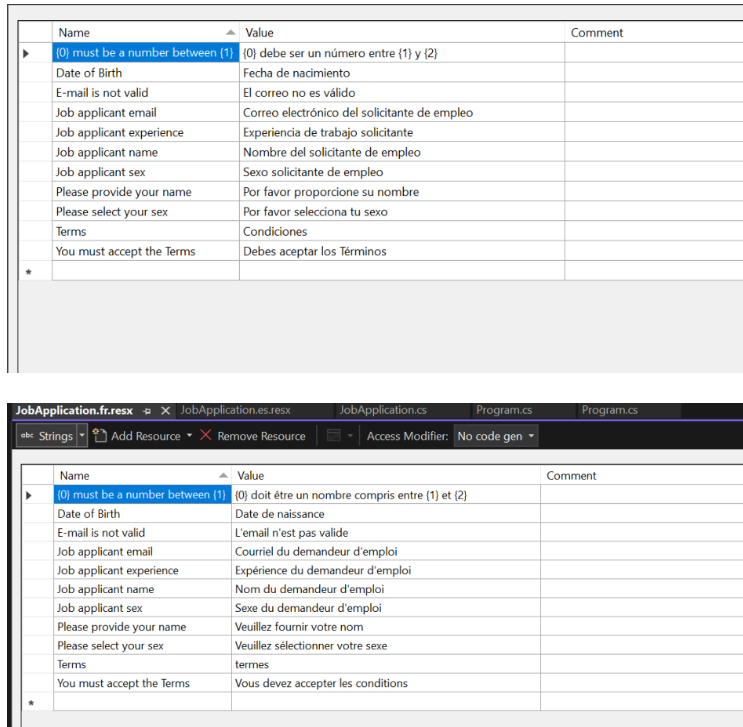
[CustomDate]
[Display(Name = "Date of Birth")]
public DateTime DOB { get; set; }
在Infrastructure文件夹创建一个新类叫CustomDate.cs,该类负责验证因此你必须继承自ValidationAttribute类,代码如下:public class CustomDate : ValidationAttribute
{
protected override ValidationResult IsValid(object value, ValidationContext validationContext)
{
var _localizationService = (IStringLocalizer<CustomDate>)validationContext.GetService(typeof(IStringLocalizer<CustomDate>));
if ((DateTime)value > DateTime.Now)
return new ValidationResult(_localizationService["Date of Birth cannot be in the future"]);
else if ((DateTime)value < new DateTime(1980, 1, 1))
return new ValidationResult(_localizationService["Date of Birth should not be before 1980"]);
return ValidationResult.Success;
}
}
在运行时使用了IStringLocalizer对象获取资源类,它是一个服务用来提供存储在资源文件中的本地化字符串var _localizationService = (IStringLocalizer<CustomDate>)validationContext.GetService(typeof(IStringLocalizer<CustomDate>));注意我使用下面代码将获取语言指定的字符串从资源文件中
_localizationService["Date of Birth cannot be in the future"]
_localizationService["Date of Birth should not be before 1980"]
接下来,在Custom验证类的目录下创建2个资源文件并且命名为:
CustomDate.es.resx
CustomDate.fr.resx
在资源文件里添加法语和西班牙语文本字符串- Date of Birth cannot be in the future & Date of Birth should not be before 1980 .
public class HomeController : Controller
{
    private readonly IStringLocalizer<HomeController> _localizer;
    public HomeController(IStringLocalizer<HomeController> localizer)
    {
        _localizer = localizer;
    }
    public IActionResult Index()
    {
        return View();
    }
    [HttpPost]
    public IActionResult Index(JobApplication jobApplication)
    {
        if (ModelState.IsValid)
            ViewBag.Message = _localizer["Your application is accepted"];
        return View();
    }
}
_localizer 是一个变量包含IStringLocalizer对象,它主要提供给我存储在资源文件中的特定文化字符串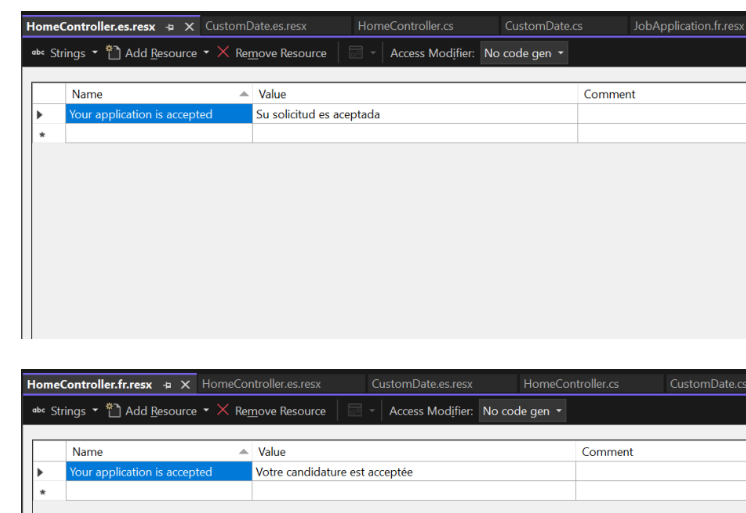
@inject IViewLocalizer LocalizerJob申请表单位于Index视图,首先你添加必要命名空间在你的视图:
@using Microsoft.AspNetCore.Builder
@using Microsoft.AspNetCore.Localization
@using Microsoft.Extensions.Options
@using Microsoft.AspNetCore.Mvc.Localization
然后在视图中注入 IViewLocalizer & IOptions ,代码如下:
@inject IViewLocalizer Localizer
@inject IOptions<RequestLocalizationOptions> LocOptions
通过RequestLocalizationOptions 对象,我将使用网站支持的语言文化填充选择控件,用户可以选择他们的文化并且表单将基于选择的文化呈现给用户
@{
    var requestCulture = Context.Features.Get<IRequestCultureFeature>();
    var cultureItems = LocOptions.Value.SupportedUICultures
        .Select(c => new SelectListItem { Value = c.Name, Text = c.DisplayName })
        .ToList();
}
<label>Language:</label>
<select onchange="SetCulture(this.value)" asp-for="@requestCulture.RequestCulture.UICulture.Name" asp-items="cultureItems">
</select>
这一小段的JavaScript代码将跳转到用户选择文化的job申请表单<script>
function SetCulture(selectedValue) {
var url = window.location.href.split('?')[0];
var culture = "?culture=" + selectedValue + "&ui-culture=" + selectedValue;
window.location.href = url + culture;
}
</script>
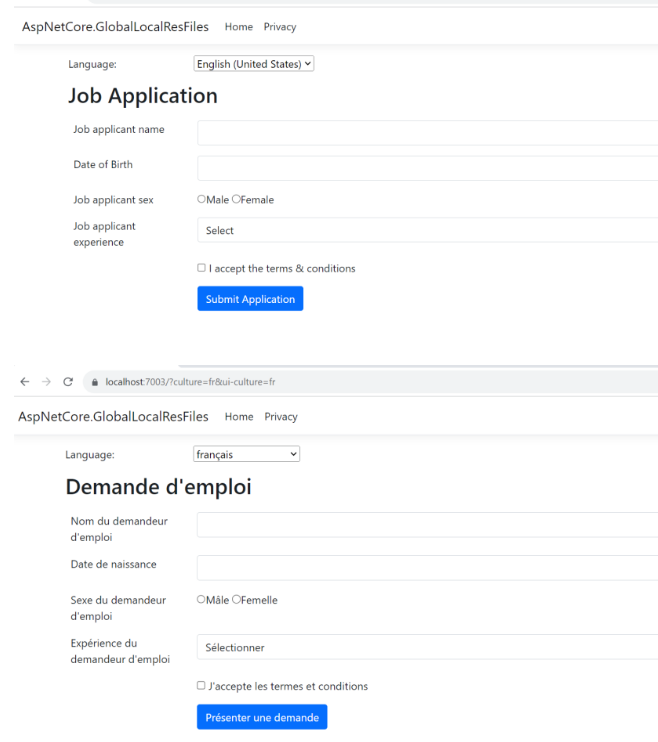
这里使用 QueryStringRequestCultureProvider,其中用户选择的文化被添加到 url 的查询字符串中,因此法语版本的应用程序表单将给与如下url:<form class="m-1 p-1" asp-action="Index" asp-route-culture="@culture" asp-route-ui-culture="@uiculture" method="post">
<div class="form-group">
<label asp-for="Name"></label>
<input asp-for="Name" class="form-control" />
<span asp-validation-for="Name" class="text-danger"></span>
</div>
<div class="form-group">
<label asp-for="DOB"></label>
<input asp-for="DOB" type="text" asp-format="{0:d}" class="form-control" />
<span asp-validation-for="DOB" class="text-danger"></span>
</div>
<div class="form-group">
<label asp-for="Sex"></label>
<div>
<input asp-for="Sex" type="radio" value="M" />@Localizer["Male"]
<input asp-for="Sex" type="radio" value="F" />@Localizer["Female"]
</div>
<span asp-validation-for="Sex" class="text-danger"></span>
</div>
<div class="form-group">
<label asp-for="Experience"></label>
<select asp-for="Experience" class="form-control">
<option value="Select">@Localizer["Select"]</option>
<option value="0">Fresher</option>
<option value="1">0-1 years</option>
<option value="2">1-2 years</option>
<option value="3">2-3 years</option>
<option value="4">3-4 years</option>
<option value="5">4-5 years</option>
</select>
<span asp-validation-for="Experience" class="text-danger"></span>
</div>
<div class="form-group">
<input asp-for="TermsAccepted" />
<label asp-for="TermsAccepted" class="form-check-label">
    @Localizer["I accept the terms & conditions"]
</label>
<span asp-validation-for="TermsAccepted" class="text-danger"></span>
</div>
<button name="formsubmit" value="Button Control" type="submit" class="btn btn-primary">@Localizer["Submit Application"]</button>
</form>
在视图中我们使用了IViewLocalizer来获取文化关联的字符串,使用代码-@Localizer["SomeString"]<input asp-for="Sex" type="radio" value="M" />@Localizer["Male"] <input asp-for="Sex" type="radio" value="F" />@Localizer["Female"]同样,terms标签也做同样的事情:
<label asp-for="TermsAccepted" class="form-check-label">
@Localizer["I accept the terms & conditions"]
</label>
接下来在与视图相同的目录下创建2个资源文件. 如下: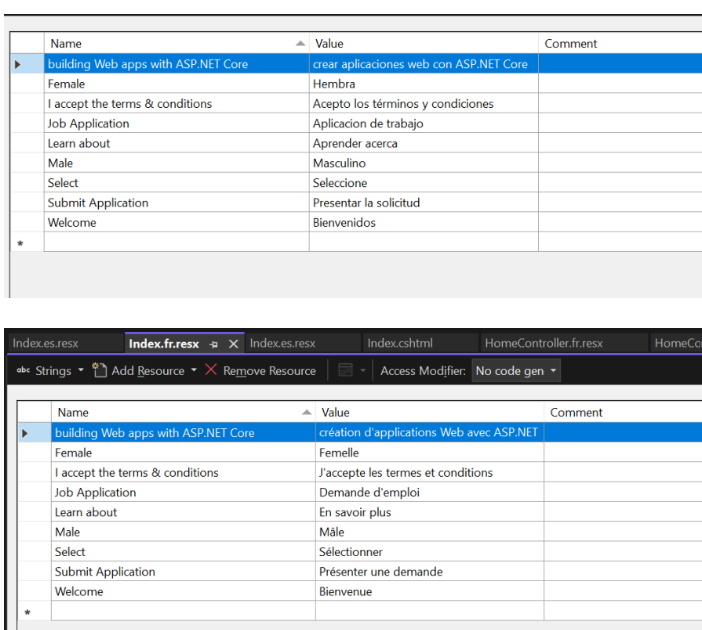

services.AddLocalization(options => options.ResourcesPath = "Resources");在这种情况下,HomeController 的资源文件应位于以下 2 个位置中的任意一个:
    Resources/Controllers/HomeController.es.resx
    Resources/Controllers/HomeController.fr.resx
2. Resources目录里面: Resources/Controllers.HomeController.es.resx
Resources/Controllers.HomeController.fr.resx
Data Annotations 资源文件位于以下2个位置中的任意一个:Resources/Models.JobApplication.es.resx Resources/Models.JobApplication.fr.resx或者
Resources/Models/JobApplication.es.resx
Resources/Models/JobApplication.fr.resx
视图资源文件位于以下2个位置中的任意一个:
Resources/Views.Home.Index.es.resx
Resources/Views.Home.Index.fr.resx
或者
Resources/Views/Home/Index.es.resx
Resources/Views/Home/Index.fr.resx